Recalculate cabinet purchases when the dwelling-type mix changes
Rebuild product demand from the revised unit mix, then compare it with confirmed committed supply so excess door bases do not hide missing drawer bases.
When a builder changes the mix of dwelling types, recalculate cabinet demand by exact configuration before changing the purchase. The total dwelling count may stay the same while the product mix changes materially. Then compare the new demand with the supply already committed to the project. Keep shortages and surpluses separate; an extra cabinet of the wrong configuration does not automatically satisfy another location's requirement.
Fix the unit list before multiplying packages
Start with the individual dwelling roster and each dwelling's accepted package revision. Identify which assignments changed and which remained fixed. Do not work only from a summary stating that the project now has more of one type and fewer of another. The destination roster catches a dwelling assigned twice, an omitted dwelling or an exception that should survive the type change.
Confirm the contents of each package revision. List the actual cabinet configurations, relevant options and separate required components. A room type is a planning label, not a product specification. If a package has unresolved choices, keep those entries visibly provisional. Do not multiply the most common option across all dwellings simply to obtain a complete-looking procurement total.
Calculate the new demand independently
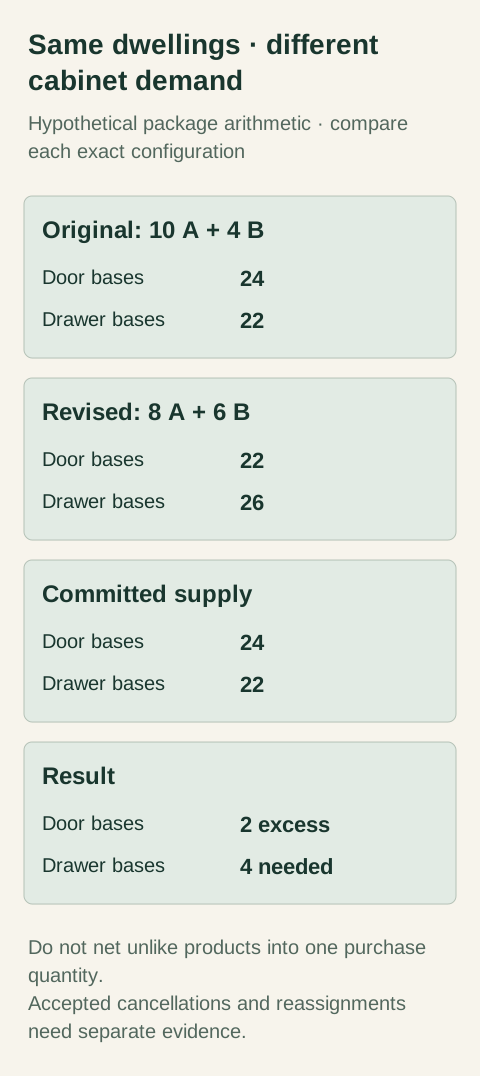
Diagram Hypothetical package arithmetic. The same dwelling total does not preserve the required product mix or alter existing supplier commitments.
Build a product-by-package matrix. For each product configuration, record the quantity required by each accepted package, then apply the dwelling counts. Keep accepted dwelling-specific exceptions outside the default multiplication and apply their additions and removals explicitly. Recalculate the whole result from the current assignments instead of editing only the rows someone remembers changing.
In this hypothetical example, type A needs 2 door bases and 1 drawer base; type B needs 1 door base and 3 drawer bases. An original mix of 10 type-A dwellings and 4 type-B dwellings requires 24 door bases and 22 drawer bases. The revised mix of 8 type A and 6 type B requires 22 door bases and 26 drawer bases. The project still has 14 dwellings. These are assumed package contents, not an actual project or usaKT.com product schedule.
The cabinet mix changed even though the dwelling count did not. Preserve both matrix versions so the reviewer can see the reason. Then trace the new totals back to the individual dwelling assignments. If a required component's quantity moves in an unexpected direction, inspect its package definition and exceptions before treating the result as a supplier change instruction.
Establish what supply is actually committed
Prepare a separate supply record using the seller's confirmed order information. Identify the product configuration, accepted quantity and project allocation. Distinguish a proposed cancellation from one the seller has accepted, and a requested replacement from a confirmed new selection. An updated demand spreadsheet does not change the existing commitment. The two records must be reconciled explicitly.
Keep available unallocated products separate from products already reserved for other work. Do not subtract every cabinet owned by the builder from this project's demand. A usable allocation requires matching product identity, options and an accepted destination decision. Likewise, a supplier's discussion of possible future stock is not the same as a confirmed quantity committed to this order.
Show surplus and shortage by configuration
Continue the hypothetical example with confirmed committed supply still at 24 door bases and 22 drawer bases. Against revised demand of 22 and 26, the project has 2 excess door bases and needs 4 more drawer bases. Reporting only a net increase of 2 cabinets hides both the shortage of the required drawer configuration and the remaining excess door products. No cancellation, credit or interchangeability is assumed.
The worksheet should show revised demand, usable committed allocation, shortage and surplus as separate fields. Keep a location map behind the allocation. A product contributes to usable supply only where the selected configuration is actually acceptable. If a proposed substitution is being reviewed, leave it pending rather than using it to make the shortage disappear before the design decision exists.
Decide what to do with each excess item
Ask whether the seller can accept the requested reduction and under what actual conditions. If it cannot, the project may consider an approved reassignment or another documented disposition. Evaluate that separately from purchasing the shortage. Do not assume the value of excess goods becomes an immediate credit against new products or that the seller will preserve the original price basis after the mix changes.
A reassignment needs the target location's requirements checked. Matching dimensions are not enough if finish, handing, preparation or accessories differ. Record the accepted destination and remove the old allocation so the same product is not counted twice. If no suitable use is established, retain the item as excess rather than naming an imaginary future project to close the table.
Make the counting method inspectable
Bluebeam's Markups List exposes count, label, space and unit fields. Those fields illustrate the distinction between a counted item and its location context. A plain spreadsheet can preserve the same relationship. Neither tool independently verifies that an allocation is appropriate or that the supplier accepted a quantity change; those conclusions need the project records behind the numbers.
Run an independent check from the dwelling roster back to each product total, then from each committed product allocation back to the roster. Compare the accepted package revisions and exceptions in both directions. Retain unresolved rows instead of forcing every difference to zero. A balanced sheet built from an unapproved substitution is less useful than a clearly explained shortage.
Issue a specific procurement request
Give the supplier the requested increases and reductions by confirmed product identity, with the current order reference and reason for the change. Keep the revised full demand schedule available for context, but do not ask the supplier to infer the transaction from the project-wide total. Request confirmation of accepted changes and any actual commercial consequences before updating committed supply.
Once the response arrives, reconcile it with both the demand and supply records. The completed file should explain which shortage was covered, which excess remains and where every accepted product is allocated. Preserve the prior versions so another buyer can reproduce the change rather than repeating it when the unit mix is discussed again.
Finish references
Pure White
Cream White
Light Warm Gray
Gray
Navy
Black
Oak Tone
Dark Walnut Tone
Design study These finish studies are design references, not a list of currently orderable colors. Screens and lighting change the appearance; compare a physical sample before choosing.See all finish options →
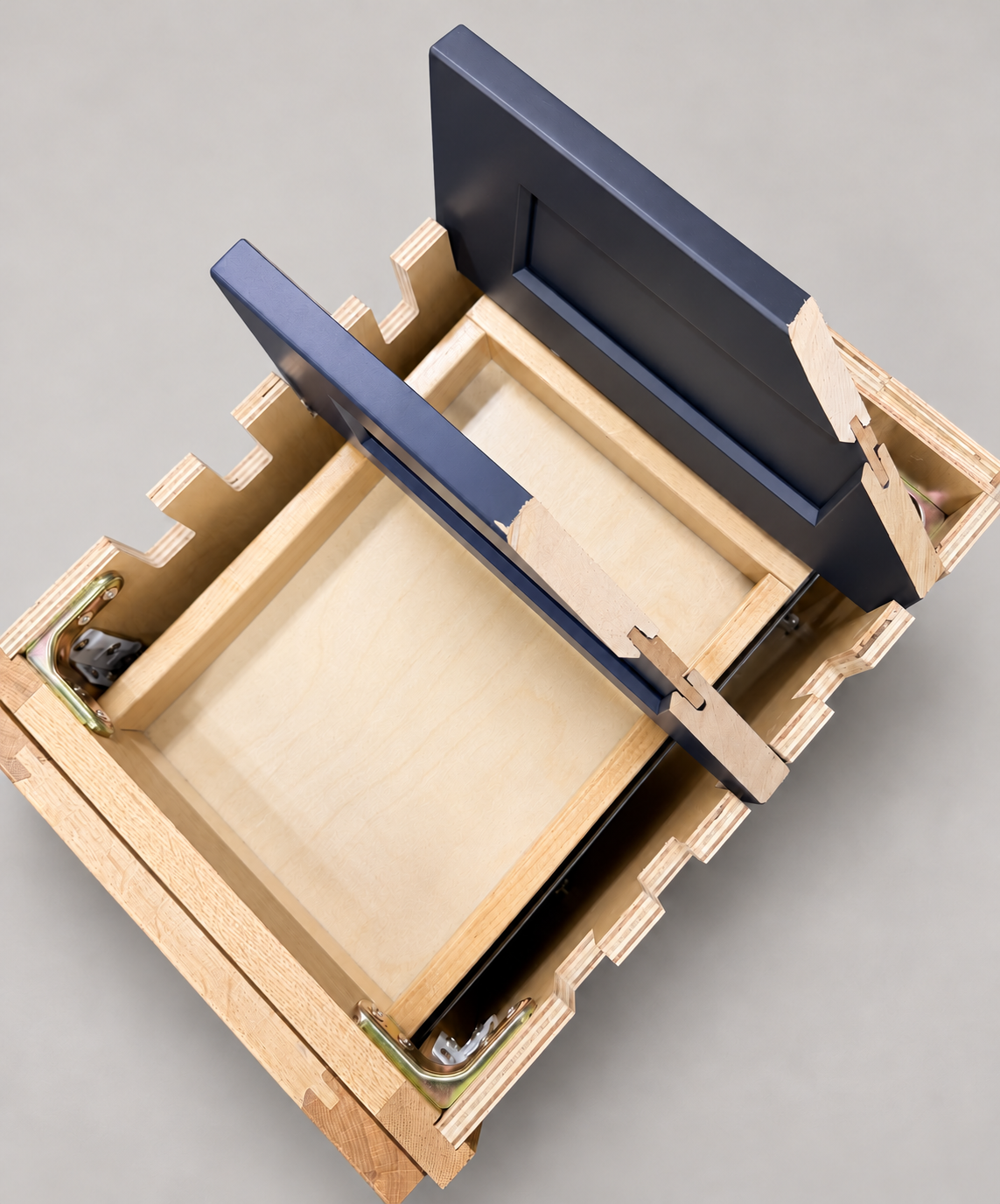
The sample shows the door frame, a separate center panel, the face frame and the cabinet box. Each component has its own place in this Shaker construction.
Shaker construction: door frame, center panel, face frame and cabinet box. The cutaway helps locate these parts; confirm each material in the specifications for the selected cabinet.
01 / Door frame
The Shaker door has rails and stiles around a separate center panel. The frame and center panel are different components; confirm their materials in the specifications for the selected cabinet.
02 / Face frame
The face frame surrounds the opening at the front of the cabinet box and sits behind the doors. The face frame, door frame and cabinet box are separate parts.
03 / Cabinet box
The sample exposes the cabinet sides, interior surfaces and layered edges. The image does not establish the wood species or material specification of a selected cabinet.