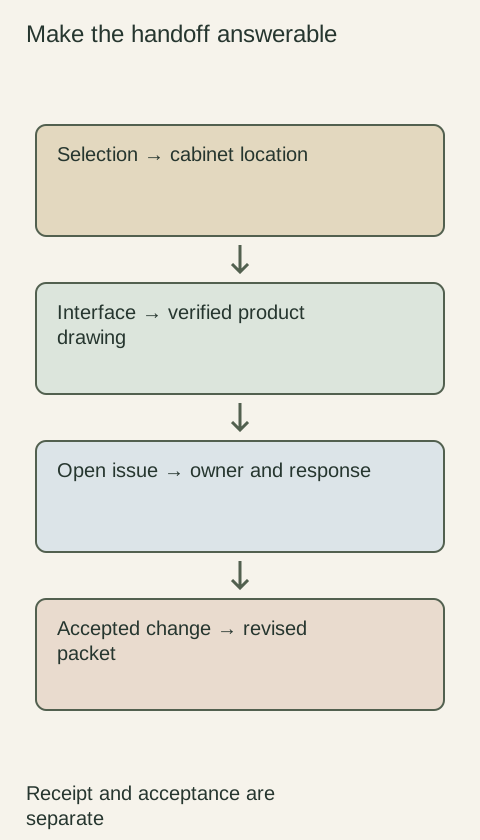
Use a cabinet demand forecast to communicate what you may need and when, while keeping the actual ordering step separately identifiable. A forecast can support a capacity conversation, but its quantities should not silently become the purchase list. Label its purpose, show unresolved selections and reconcile it with released orders. This prevents the same project from being counted as both future demand and a new requirement after ordering.
Diagram Keep the forecast revision connected to the order record without treating the planning handoff as an order release.
Describe what the forecast represents
Identify the projects included, their expected purchasing periods and the assumptions behind the quantities. Distinguish confirmed project scope from prospective work still being discussed. If several finish options describe alternative versions of the same project, identify them as alternatives rather than adding all their cabinet quantities into the expected requirement.
Use the level of detail the evidence supports. An early estimate may identify product families and approximate demand without settled door or finish selections. Do not fill those gaps with a convenient configuration that could later be mistaken for the client's choice. Note who can resolve each uncertainty and what development would justify revising the forecast.
Keep planning and ordering records visibly different
Give the forecast its own title, revision and status. State that it is being shared for planning, and identify the separate process used to submit a purchase order or release. Avoid placing an informal forecast in a completed order form without explaining its status, especially when the recipient normally uses that form to start processing work.
Microsoft's planning documentation distinguishes planned orders from actual purchase orders created through a release step. That is a useful workflow distinction, even when a cabinet team uses a spreadsheet rather than that software. Establish the actual supplier's ordering process instead of assuming a planning document, a positive sales reply or a software status has performed it.
Reconcile forecast quantities when a project is ordered
Choose whether the forecast shows total anticipated demand including ordered work, or only demand not yet ordered. State that convention on the document and apply it consistently. If ordered work remains in the total view, show it as already ordered and link the relevant record. If the view shows uncommitted demand, move that portion out when the actual order is recorded.
Imagine a dealer shares a forecast for a housing phase and later orders the accepted cabinets for that phase. If the next forecast still lists the entire phase as future demand, a supplier may read it as additional work. Reconcile the project identity and ordered scope before sending the update, rather than expecting the recipient to recognize the duplicate from a familiar project name.
Ask what a supplier's forecast response actually means
A reply that expected demand looks manageable is different from a confirmed allocation for specified products. Ask what assumptions the response uses, whether anything has been reserved and what further action is needed before the supplier can confirm an order. Keep timing estimates linked to their conditions rather than presenting a planning discussion as a fixed delivery commitment.
Where someone proposes a separate capacity or material reservation, review that arrangement explicitly instead of hiding it inside the forecast exchange. Record its scope and next steps in the appropriate purchasing documents. This article does not determine the effect of any particular agreement; it helps prevent a team's internal planning status from being mistaken for a completed supplier action.
Update changes without rewriting order history
When a project is postponed, reduced or changes product direction, identify the affected forecast entries and explain the change. Retain the previous revision so the recipient can see what moved. If some of the work is already ordered, review that order separately; reducing a forecast line does not establish that the corresponding order was changed or canceled.
Before sharing the next version, check for alternative scenarios counted together, already ordered quantities still shown as new demand and assumptions that have become outdated. Send a concise explanation of material changes and retain the supplier's response. A useful forecast remains traceable enough to plan with while making clear which selections and purchase actions still need to happen.
Pure White
Cream White
Light Warm Gray
Gray
Navy
Black
Oak Tone
Dark Walnut Tone
Design study These finish studies are design references, not a list of currently orderable colors. Screens and lighting change the appearance; compare a physical sample before choosing.See all finish options →
Translate the design into identifiable products, details and responsibilities. A useful handoff lets another professional price and build the intended arrangement without reconstructing private conversations.
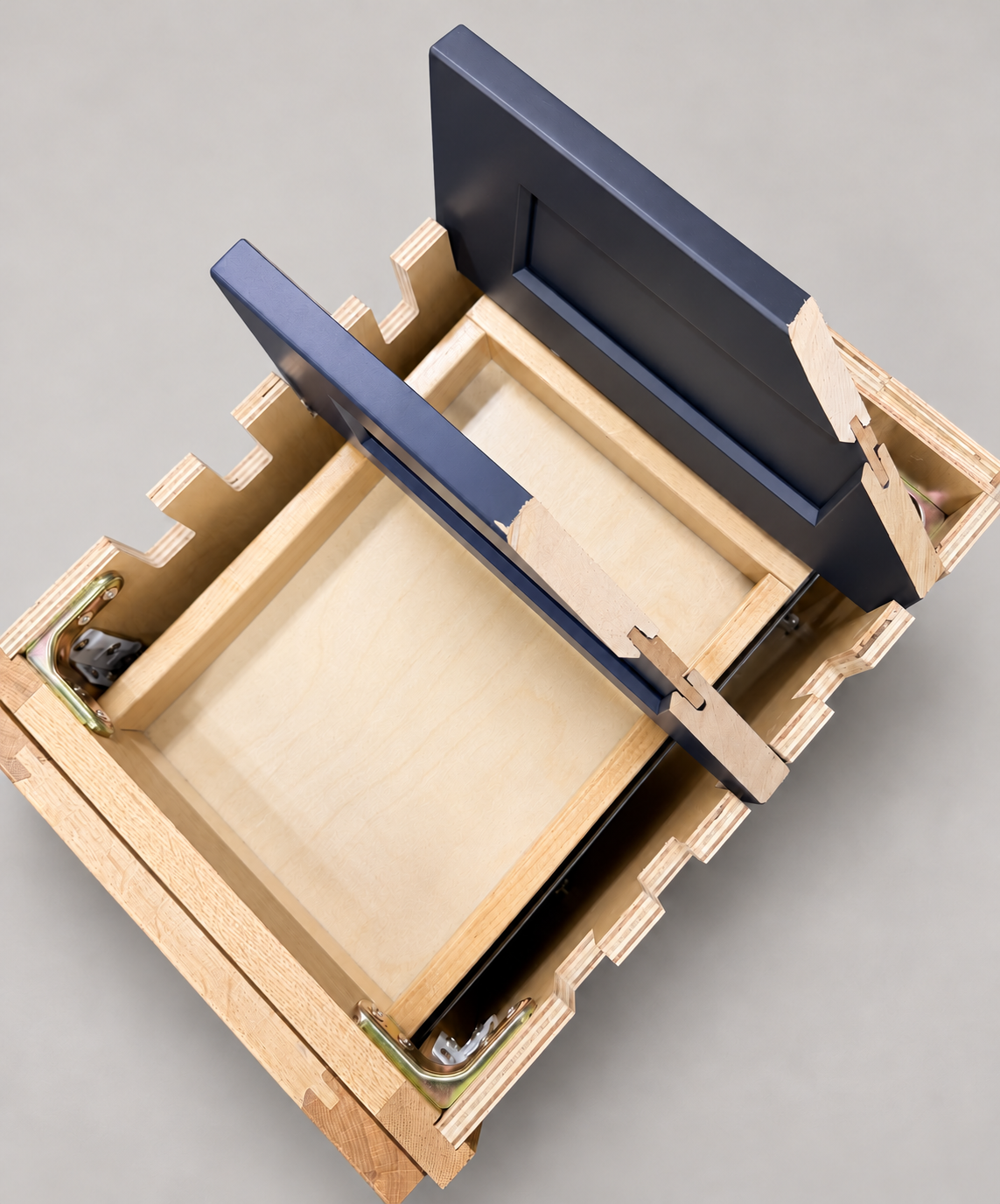
The sample shows the door frame, a separate center panel, the face frame and the cabinet box. Each component has its own place in this Shaker construction.
Shaker construction: door frame, center panel, face frame and cabinet box. The cutaway helps locate these parts; confirm each material in the specifications for the selected cabinet.
01 / Door frame
The Shaker door has rails and stiles around a separate center panel. The frame and center panel are different components; confirm their materials in the specifications for the selected cabinet.
02 / Face frame
The face frame surrounds the opening at the front of the cabinet box and sits behind the doors. The face frame, door frame and cabinet box are separate parts.
03 / Cabinet box
The sample exposes the cabinet sides, interior surfaces and layered edges. The image does not establish the wood species or material specification of a selected cabinet.