Reconcile a cabinet takeoff revision without hiding replacements
Use an added-and-removed quantity ledger to explain what changed between cabinet drawing revisions, including replacements that leave the total count unchanged.
A revised cabinet takeoff should explain what left the package as well as what entered it. Compare the old and new selections at each stable location, then calculate the resulting quantities by exact product configuration. A grand total is only a check. It cannot reveal that a drawer base replaced a door base, that a cabinet moved between rooms or that an exposed panel disappeared when a run changed.
Choose the actual starting package
Name the drawing revision and takeoff that produced the last accepted count. If that count was used for pricing but never ordered, label it accordingly. If an order exists, preserve its accepted quantities separately. Comparing against yesterday's working spreadsheet may explain a designer's edits while missing the larger difference from what purchasing has already committed. These are useful comparisons, but they answer different questions and should not share an unexplained baseline.
Keep a copy of the old location schedule. Match each location with the corresponding location in the new drawing before sorting by supplier code. Location is the link between versions; product code describes the selected item. If a label has changed, write the old-to-new label association explicitly. Otherwise a simple renumbering can look like a removed cabinet and a newly added cabinet, producing a false change request.
Classify the change before calculating it
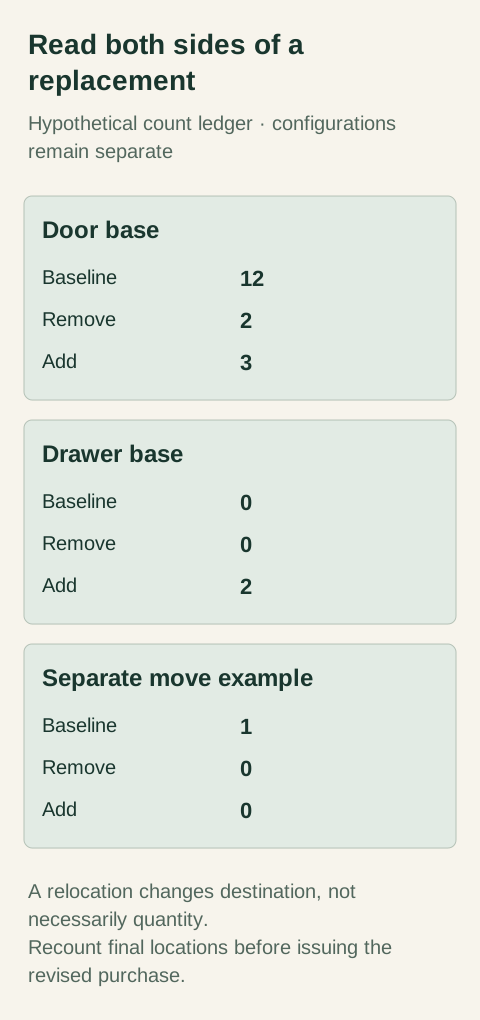
Diagram Hypothetical quantity example. A replacement has a removal and an addition; a relocation can leave the count unchanged.
Use clear dispositions: retained, added, removed, replaced and relocated. A replacement has a removal side and an addition side. A relocation can have no change in cabinet quantity but still alter its finish treatment, handing or adjacent parts. Examine those options before calling the whole selection unchanged. If the same box needs a different finished end, retain the box only if the selected supplier confirms that its ordered configuration truly remains the same.
Write the reason and drawing location beside each disposition. For a replaced cabinet, keep both complete descriptions: original product and options, then proposed product and options. A note saying “change to drawers” does not establish whether the original shelves, fronts or accessories remain included. The supplier's package may group them differently. Make the purchasing instruction reflect that grouping instead of inventing component credits that have never been offered.
Bluebeam documents comparison clouds and colored PDF overlays for finding drawing differences. They locate changes; they do not determine the purchasing consequence. A shifted dimension label can appear as a visual change without changing a cabinet, while a finish schedule change may affect many cabinets without moving a line on the plan. Review the written schedules alongside the graphics.
Work through additions and replacements separately
In this hypothetical example, the baseline contains 12 identical door bases. The new drawing replaces 2 of them with drawer bases and adds 3 more door bases elsewhere. The retained door-base quantity is 10; the added door bases are 3. The new drawer-base quantity is 2. The revised package contains 15 cabinets. An added-only list would keep all 12 original door bases and add the drawer bases as well, incorrectly retaining the replaced products.
Keep the replacement locations visible even when the supplier wants an aggregated order. The revised door-base quantity is obtained by subtracting the removed door bases before adding the new ones; the drawer-base quantity starts from its own baseline. Do not combine unlike cabinet configurations into a single net-change row. The project might have a small net increase while requiring substantial product changes that the supplier must review independently.
For another hypothetical change, 1 retained cabinet moves from the pantry wall to a utility room. Its quantity change is 0. Record the original and new destination, then check the selected finish, exposed sides and associated loose parts. A zero quantity change closes only the count question. It does not establish that the product will work at its new location or that the supplier's allocation has changed.
Reconcile the arithmetic in both directions
For each exact configuration, start with the old quantity, subtract removals and add additions. Separately count the final destinations shown in the revised drawings. The results should agree. If they do not, inspect replacement pairs, renumbered labels and locations appearing in both an enlarged plan and an overall plan. A formula can balance while referring to the wrong destinations, so retain the location evidence behind each total.
Then work backward from each final location. Confirm that it points to an ordered or proposed item, and that no removed location still contributes to a subtotal. Keep alternative designs outside this count. A drawing issued for discussion should not enter the same total as the accepted layout simply because both files are stored in the project folder. Record which design scenario the takeoff actually represents.
Keep unresolved changes outside a purchase instruction
If the replacement code is unknown, retain the location and required function with a pending status. Do not guess the nearest catalog code to make the ledger look complete. Ask the responsible designer or supplier to resolve the specific missing property. Meanwhile, the ledger can still identify the original item potentially affected, the connected components and the decisions that must be answered before the change is executable.
Where the old package has already been ordered, a revised takeoff is a change request rather than evidence of a canceled item. Ask the seller which removals and additions it can accept, then reconcile its response with the proposed ledger. An unavailable credit or an item already processed may leave a surplus that the project must address. Keep that surplus visible instead of silently subtracting it from the new demand.
Retain a count another person can reproduce
Issue the final location schedule, the change ledger and the complete resulting product quantities together. The cover note should identify the compared revisions, the purpose of the issue and any held lines. Include the reviewer and the date of the independent recount. Keep both revisions available so the next buyer can distinguish a deliberate replacement from an accidental duplicate without searching private messages.
Finish references
Pure White
Cream White
Light Warm Gray
Gray
Navy
Black
Oak Tone
Dark Walnut Tone
Design study These finish studies are design references, not a list of currently orderable colors. Screens and lighting change the appearance; compare a physical sample before choosing.See all finish options →
Approve a set of documents that agrees with itself. A drawing shows where parts go; the bill of materials identifies what will be ordered; the approval record says which version is authorized.
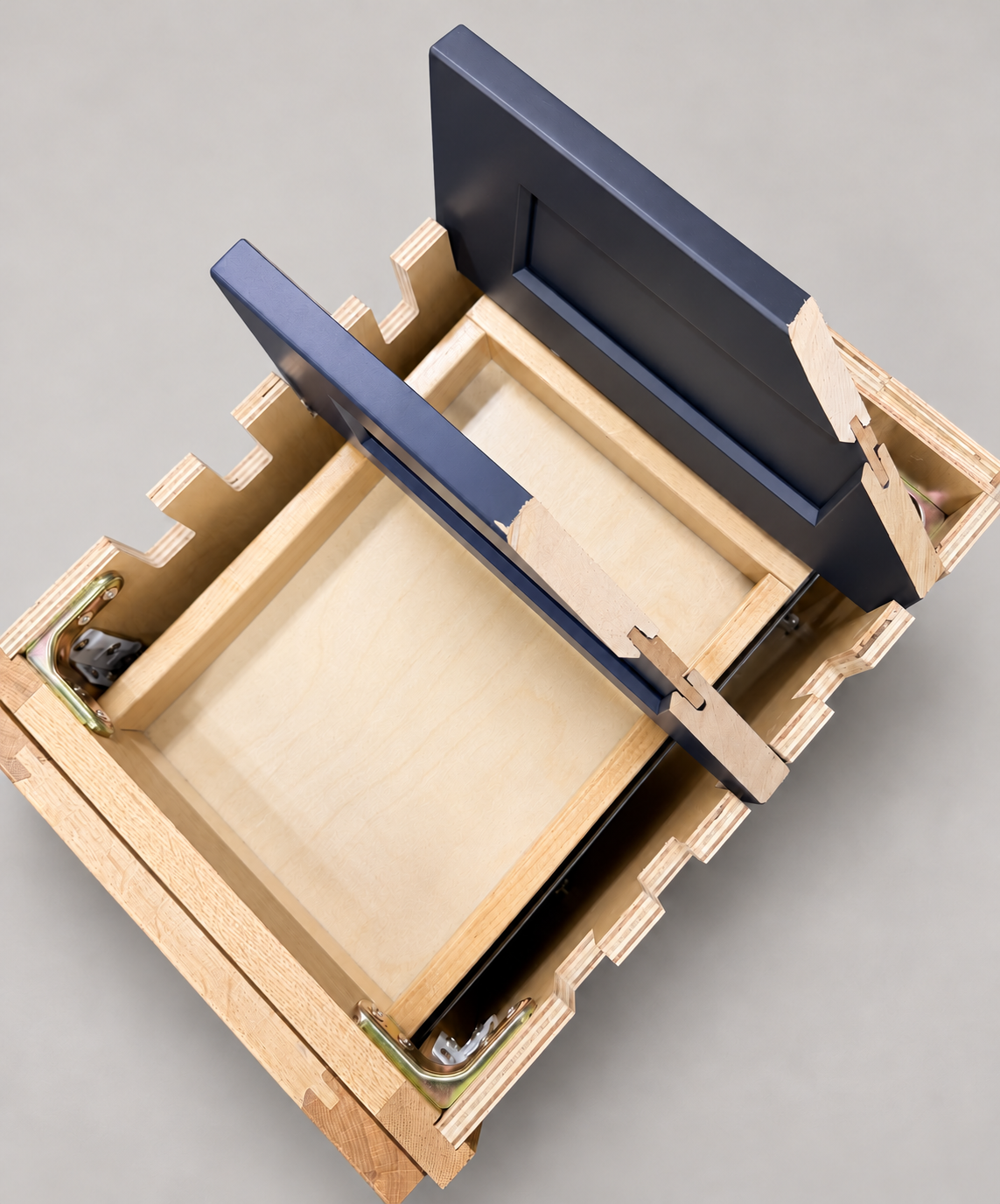
The sample shows the door frame, a separate center panel, the face frame and the cabinet box. Each component has its own place in this Shaker construction.
Shaker construction: door frame, center panel, face frame and cabinet box. The cutaway helps locate these parts; confirm each material in the specifications for the selected cabinet.
01 / Door frame
The Shaker door has rails and stiles around a separate center panel. The frame and center panel are different components; confirm their materials in the specifications for the selected cabinet.
02 / Face frame
The face frame surrounds the opening at the front of the cabinet box and sits behind the doors. The face frame, door frame and cabinet box are separate parts.
03 / Cabinet box
The sample exposes the cabinet sides, interior surfaces and layered edges. The image does not establish the wood species or material specification of a selected cabinet.