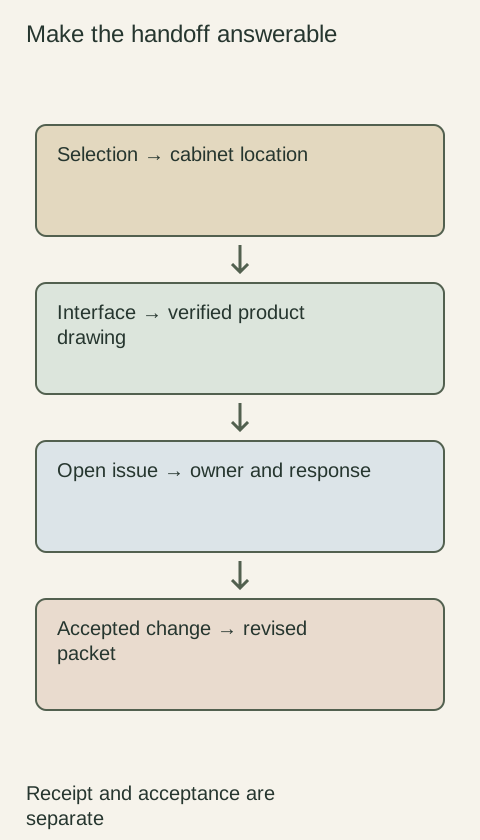
A cabinet drawing label identifies a project location or design item; a supplier code identifies a product or configured selection. Keep both in a cross-reference record so a buyer can trace a drawing item to the ordered product and a receiver can trace an order line back to its intended location. Do not replace the drawing labels with catalog codes alone. Identical products can appear in several locations, while apparently similar cabinets can require different options.
Diagram Maintain both location labels and full product identities. The diagram does not supply a project-specific code mapping.
Preserve a stable project identity
Use the project's existing cabinet labels and identify the drawing or schedule in which they appear. If labels repeat in different rooms or buildings, include that context in the record. A label that is unique only on a single sheet is not necessarily unique across the whole order. Establish the complete reference before grouping quantities or sending questions to the supplier.
Decor Cabinets asks for detailed numbered elevations and other product information to support order review. That illustrates the value of identifying the relevant location rather than sending an isolated product name. It does not prescribe a universal labeling system; the team's chosen labels simply need to remain understandable across its drawings and purchasing documents.
Link the complete selected product, not just its base code
Beside the project reference, record the supplier, product code, description and options needed to identify the ordered item. Include the relevant finish, dimension or modification references when those are recorded separately from the base code. Ask the supplier which fields together define the actual selection. A catalog code may not contain every project-specific choice.
Imagine neighboring cabinets share a base product code, but only the cabinet at the exposed end needs a particular finished side. Their cross-reference entries should preserve that distinction. If the order groups them under a shared description, show how the option is assigned to the appropriate cabinet. The purpose is not to invent new product codes, but to prevent a location-specific requirement from disappearing.
Explain grouped lines and separate components
The relationship is not always a single drawing label matched to a single order line. A cabinet location may require a box, separate front and finishing panel, while an order line may combine repeated identical cabinets from several locations. Record the relevant component links and quantities without pretending each supplier package has the same structure as the drawing schedule.
Check that every required drawing item appears somewhere in the purchasing record and that every ordered component has an intended application. Avoid counting a panel both as an included option and as a separately ordered item. If the supplier cannot explain a grouping, leave it unresolved rather than assigning it to whichever drawing label seems most similar.
Keep identity stable when the design is revised
When a cabinet changes, update its product association and retain the history of the previous selection. Do not silently reuse a removed location's label for a different item without recording that reassignment. Otherwise an old email or replacement request can point to the wrong cabinet even though the current schedule appears internally consistent.
Identify who maintains the cross-reference and which revision accompanies a purchasing release. When supplier codes change or a substitution is accepted, check the affected drawing, schedule and order references together. A spreadsheet search-and-replace is not a substitute for reviewing whether the new product still represents the intended component and its location-specific options.
Make the record useful to receiving and later service
Before ordering, ask how the supplier's product identity will appear on its acknowledgment and packaging. Share the cross-reference with receiving staff so unfamiliar catalog codes can be connected to the project's labels. Keep original supplier labels readable; if the team adds location labels, use them as a supplement rather than obscuring the product's own identity.
Retain the final mapping with the installed-product record and update any accepted field reassignment. Later, a service question can name both the cabinet location and the actual ordered component. The mapping does not prove dimensions, compatibility or delivery completeness. It supplies the connection that lets those checks use the right product information instead of a plausible but unrelated code.
Pure White
Cream White
Light Warm Gray
Gray
Navy
Black
Oak Tone
Dark Walnut Tone
Design study These finish studies are design references, not a list of currently orderable colors. Screens and lighting change the appearance; compare a physical sample before choosing.See all finish options →
Translate the design into identifiable products, details and responsibilities. A useful handoff lets another professional price and build the intended arrangement without reconstructing private conversations.
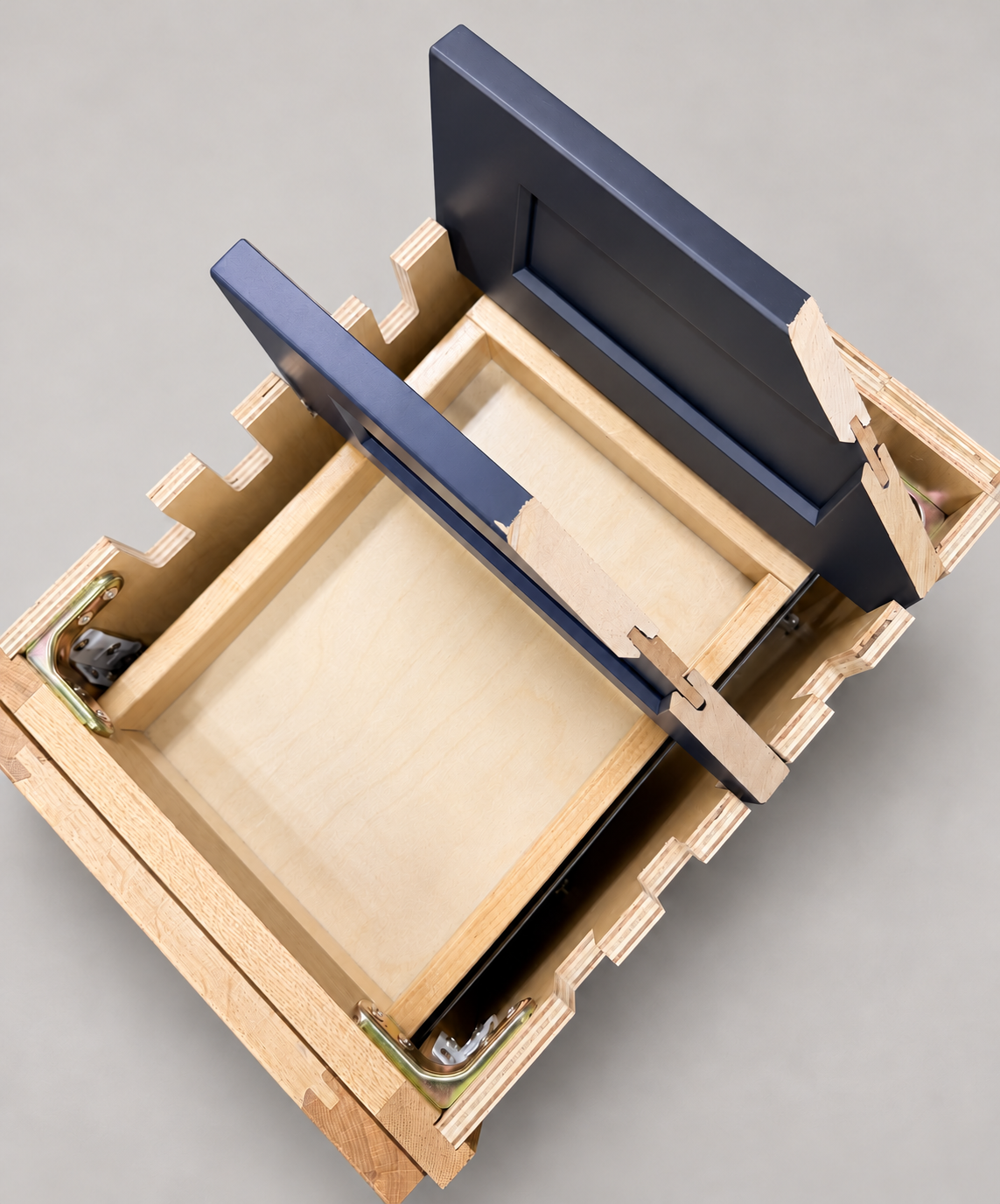
The sample shows the door frame, a separate center panel, the face frame and the cabinet box. Each component has its own place in this Shaker construction.
Shaker construction: door frame, center panel, face frame and cabinet box. The cutaway helps locate these parts; confirm each material in the specifications for the selected cabinet.
01 / Door frame
The Shaker door has rails and stiles around a separate center panel. The frame and center panel are different components; confirm their materials in the specifications for the selected cabinet.
02 / Face frame
The face frame surrounds the opening at the front of the cabinet box and sits behind the doors. The face frame, door frame and cabinet box are separate parts.
03 / Cabinet box
The sample exposes the cabinet sides, interior surfaces and layered edges. The image does not establish the wood species or material specification of a selected cabinet.