Cabinet drawings, bill of materials and order approval
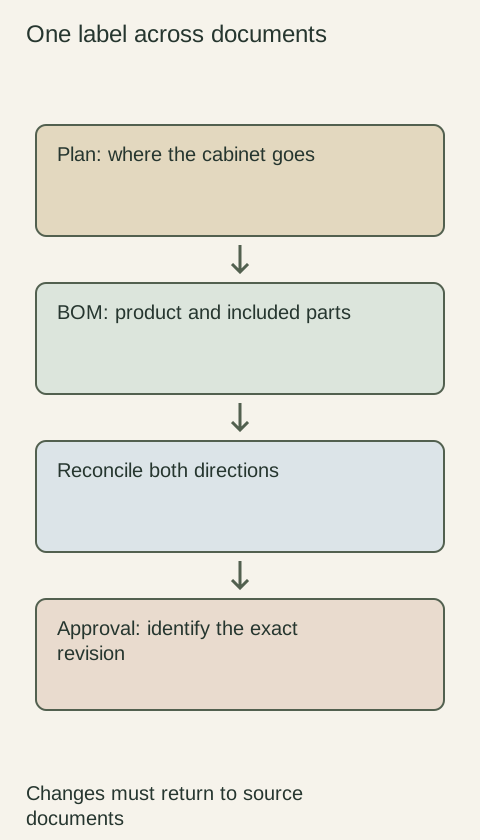
Approve a set of documents that agrees with itself. A drawing shows where parts go; the bill of materials identifies what will be ordered; the approval record says which version is authorized.
NKBA drawing resources explain the use of detailed drawings when general views do not explain an assembly. Manufacturer planning sources, such as Blum's services, supply information for specific hardware. Use those documents for the selected products, then coordinate them with the room plan. A rendering can communicate appearance, but it cannot replace a dimensioned drawing or an itemized order.
Build a document register containing file name, revision, issue date, author, purpose and status. Use plain statuses such as draft, pending field check and approved for the stated purchase. Identify a single current set. Keep superseded files available for history but make them unmistakable. Approval of a layout does not automatically approve a later finish substitution or a different bill of materials.
Tie each cabinet to a stable location label
Give every opening a location label that appears on the plan, elevations and bill of materials. Do not use a page position as its identity: an item can move when a drawing is revised. For each location, record product code, quantity, outside dimensions with units, door and drawer arrangement, handedness, finish and relevant modification.
List fillers, exposed panels, toe kicks, trim, hardware and required accessories as actual line items. A beautiful elevation can conceal the fact that a panel never reached the order. Use a note explaining which decorative features are separate parts and which are included in the cabinet code. Keep installation consumables and site-built items in a separate responsibility field so they are not silently assumed to arrive with the cabinets.
Diagram Illustrative diagram; not a product specification.
Reconcile the documents in both directions
Start at each plan label and find its elevation and order line. Then start at each order line and locate its destination on the drawing. Compare quantity, dimensions, handedness and finish, including repeated cabinets that look similar. Resolve a mismatch in the source documents instead of patching it only in an email.
Review adjacent appliances using their exact installation information. Check filler and panel locations, door travel, service access and any field dimension still waiting for verification. Label an unverified dimension rather than presenting a scaled measurement from a PDF as an actual room measurement. The responsible field-measuring party should identify what they verified and what remains an assumption.
Use an example record to expose omissions
Consider an illustrative line labeled “sink-left.” Its order record says drawer base, selected finish, pull reference and open side facing the walkway. The elevation shows a finished decorative end, but the bill of materials lists only the drawer base. That discrepancy creates a specific action: identify whether the end is included, add the correct panel if separate and revise the linked documents before purchase approval.
Give the issue an owner, required decision and status. “Panel check, purchasing, waiting for confirmed code” is actionable; “make it look like the picture” is not. Once resolved, record the replacement code or inclusion note in the bill of materials and the detail on the elevation. Keep the original question in the decision history so a later reviewer can understand the change.
Approve scope and exclusions explicitly
The approval record should name the document set and revision, the approved products, unresolved items and the authorized purpose. Separate aesthetic approval from field verification and order release when different people own them. A signature does not supply missing dimensions or manufacturer requirements. If a critical field remains open, identify the affected line as pending rather than treating the whole packet as unconditionally released.
After a change, show what moved: product code, quantity, finish, dimension or responsibility. Obtain approval for the affected change before purchasing the revised selection. Avoid instructions such as “use the latest attachment,” which become ambiguous when files are forwarded or downloaded in a different order.
Create a packet the receiver can use
Send or store the approved drawing set, bill of materials, finish and hardware schedule, appliance references and decision log together under the exact revision identifier. The procurement party should be able to repeat the line-by-line check without access to a private conversation. When goods arrive, those location labels also support receiving and installation. The goal is a traceable order that matches the room and the approved choices, with the remaining field work clearly assigned.
Run a tabletop order check
Place the current plan and bill of materials side by side. Have the checker point to a cabinet label, read its order code aloud and identify the door, finish, exposed sides and required loose parts.
Mark the line only after both documents agree. Repeat in reverse for unplaced parts.
When an issue appears, give it an owner and update the approved source before releasing the affected line. A saved checklist records the work, but the corrected documents are what prevent the omission from returning when another person places the order.
Finish references
Pure White
Cream White
Light Warm Gray
Gray
Navy
Black
Oak Tone
Dark Walnut Tone
Design study Design references only. The finish studies do not establish actual material, color matching or availability. Compare the selected physical sample.See all finish options →
Choose the service that covers the decisions your remodel actually needs. Compare product choices, room coordination, drawings and compensation before paying for overlapping work.
A microwave on a table is not a complete meal arrangement. Decide what you will prepare, where the supplies will live and how cleanup works before the old kitchen is removed.
A smaller first order is useful only if it leaves a finished, usable kitchen and does not force expensive work to be repeated. Separate genuinely independent additions from connected cabinet and countertop work.
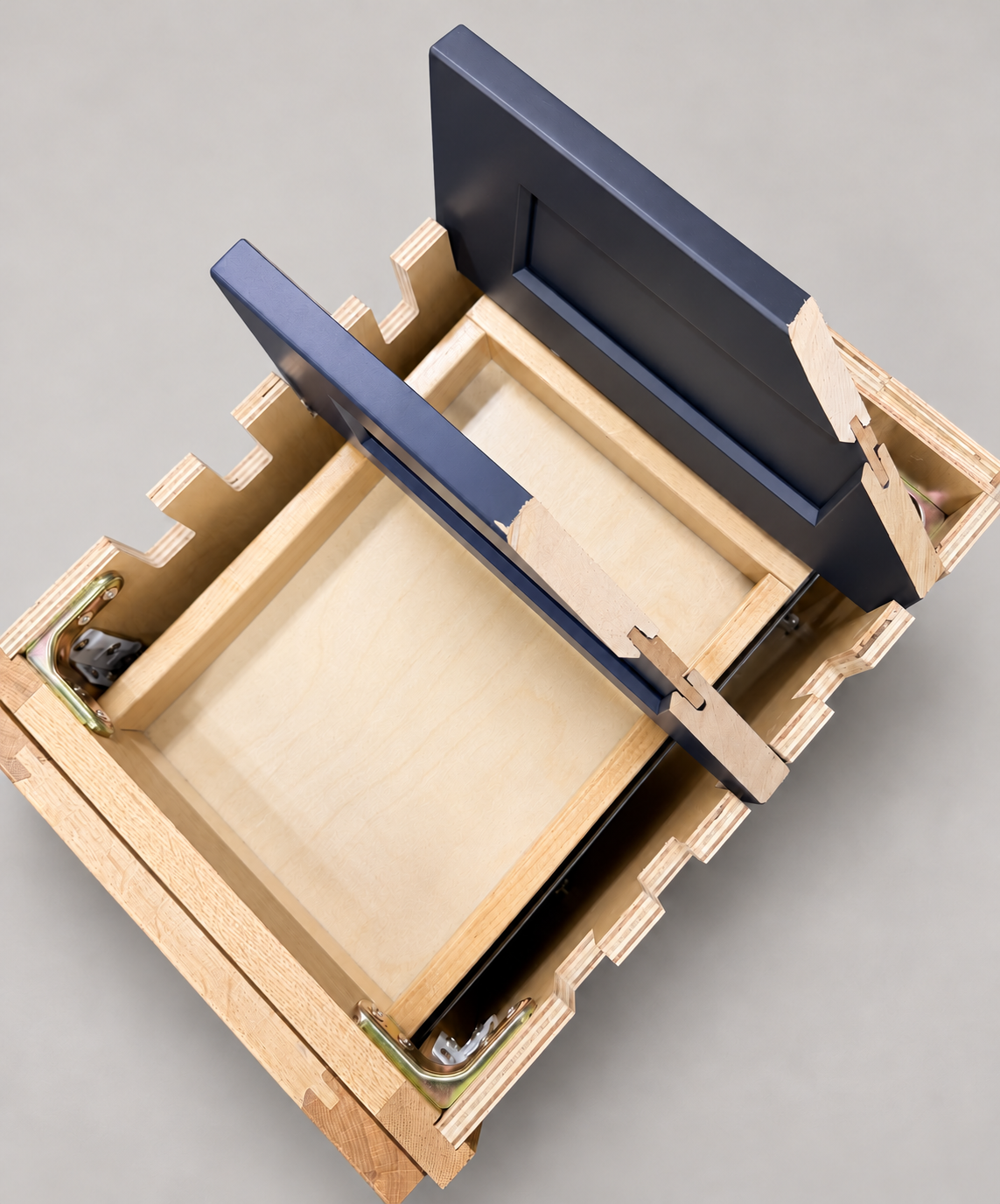
The sample shows the door frame, a separate center panel, the face frame and the cabinet box. Each component has its own place in this Shaker construction.
Shaker construction: door frame, center panel, face frame and cabinet box. The cutaway helps locate these parts; confirm each material in the specifications for the selected cabinet.
01 / Door frame
The Shaker door has rails and stiles around a separate center panel. The frame and center panel are different components; confirm their materials in the specifications for the selected cabinet.
02 / Face frame
The face frame surrounds the opening at the front of the cabinet box and sits behind the doors. The face frame, door frame and cabinet box are separate parts.
03 / Cabinet box
The sample exposes the cabinet sides, interior surfaces and layered edges. The image does not establish the wood species or material specification of a selected cabinet.