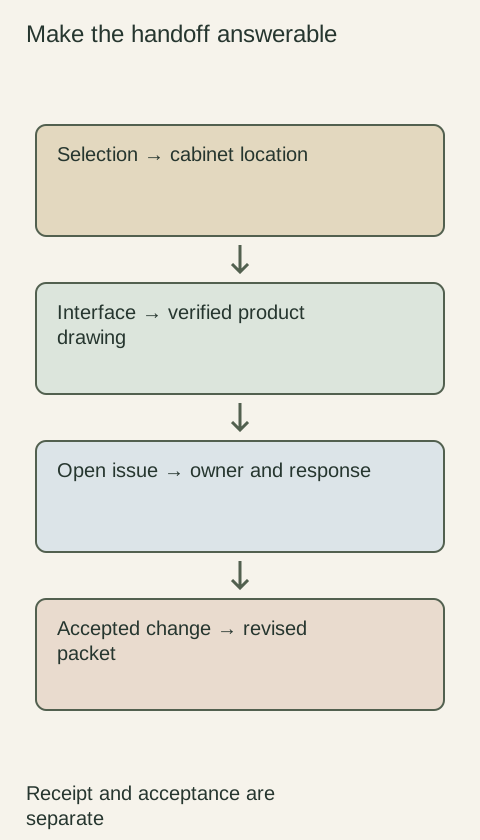
After selecting a cabinet online, compare the actual order details with the variant and components you intended to buy. The main product photograph may show a different finish, a complete styled scene or optional pieces. Preserve the selected product information, then check that the cart and confirmation identify the same purchase. A familiar picture is not a substitute for a precise item description.
Diagram Preserve the chosen variant and included components. The diagram is a documentation aid, not an online store interface.
Capture the selected variant, not the default page
Record the product identity and the size, finish, door configuration and other options you selected. Check whether changing an option changes the item number or description. When saving a screenshot, include the selected controls and written specification; a cropped photograph alone may not show which variant was active when you decided to purchase the cabinet.
If the page returns to a default selection when reopened, use your saved selection record to compare it with the cart. Do not assume that a bookmarked URL preserves every choice. If a specification and photograph appear inconsistent, ask the seller about the exact variant before submitting. The goal is to identify the purchase, not to decide which part of an ambiguous page to believe.
Distinguish the product from the styled scene
Read the included-components description. Identify whether doors, drawer fronts, hardware, finished panels and other visible pieces are supplied together or selected separately. A photographed countertop, pull or accessory can illustrate use without being included. Ask the seller to clarify missing information instead of treating everything shown around a cabinet as part of the price.
Imagine a listing picture shows a cabinet with decorative pulls, but the written contents identify the cabinet and fronts without pulls. Before ordering, establish whether you must choose and buy hardware separately. Saving the picture does not resolve the mismatch. A clear list of included pieces is more useful for purchasing than an assumption about how a finished scene was assembled.
Check the cart as a fresh selection record
Review the cart item by item after all changes. Confirm quantities, unit descriptions and selected variants, especially when similar products share a thumbnail. A repeated image does not prove the entries are identical, and a single line called set needs an explanation of its contents. Do not infer how many individual components it contains from the photograph alone.
Check items added automatically or removed when another choice changes. If an accessory is required for the selected product, verify whether it is already included, separately listed or still absent. Avoid ordering duplicates merely because the accessory appears in a recommendation panel. Keep unresolved contents questions outside a ready-to-submit list until the seller explains the intended combination.
Read the confirmation beyond its total
When a confirmation arrives, compare its item identities, descriptions, quantities and options with your saved selection and final cart. IKEA US recommends using the order confirmation and product article numbers when checking delivered goods. That reinforces the value of identifiable order details rather than relying on a marketing photograph. It does not describe usaKT's ordering system.
If the confirmation abbreviates the finish or omits a critical option, ask for written clarification tied to the order. Do not silently substitute your preferred interpretation. Also separate an acknowledgment that a request was received from whatever the seller uses to confirm accepted products. A payment total by itself cannot prove that the right door variation or required component was recorded.
Resolve differences while preserving the evidence
For any discrepancy, identify the item, the selected information and the different confirmation entry. Attach the relevant saved page and ask the seller to confirm the intended product or explain the correction process. Avoid editing the only copy of the confirmation to make it look right; that would remove the evidence of what the seller actually sent.
Retain the seller's reply and any replacement confirmation with the original transaction. Later page changes do not automatically update an existing order, so continue using the accepted order information when preparing to receive it. The completed check leaves a documented path from selection to cart to confirmed item, with the component scope clear enough to recognize what should arrive.
Pure White
Cream White
Light Warm Gray
Gray
Navy
Black
Oak Tone
Dark Walnut Tone
Design study These finish studies are design references, not a list of currently orderable colors. Screens and lighting change the appearance; compare a physical sample before choosing.See all finish options →
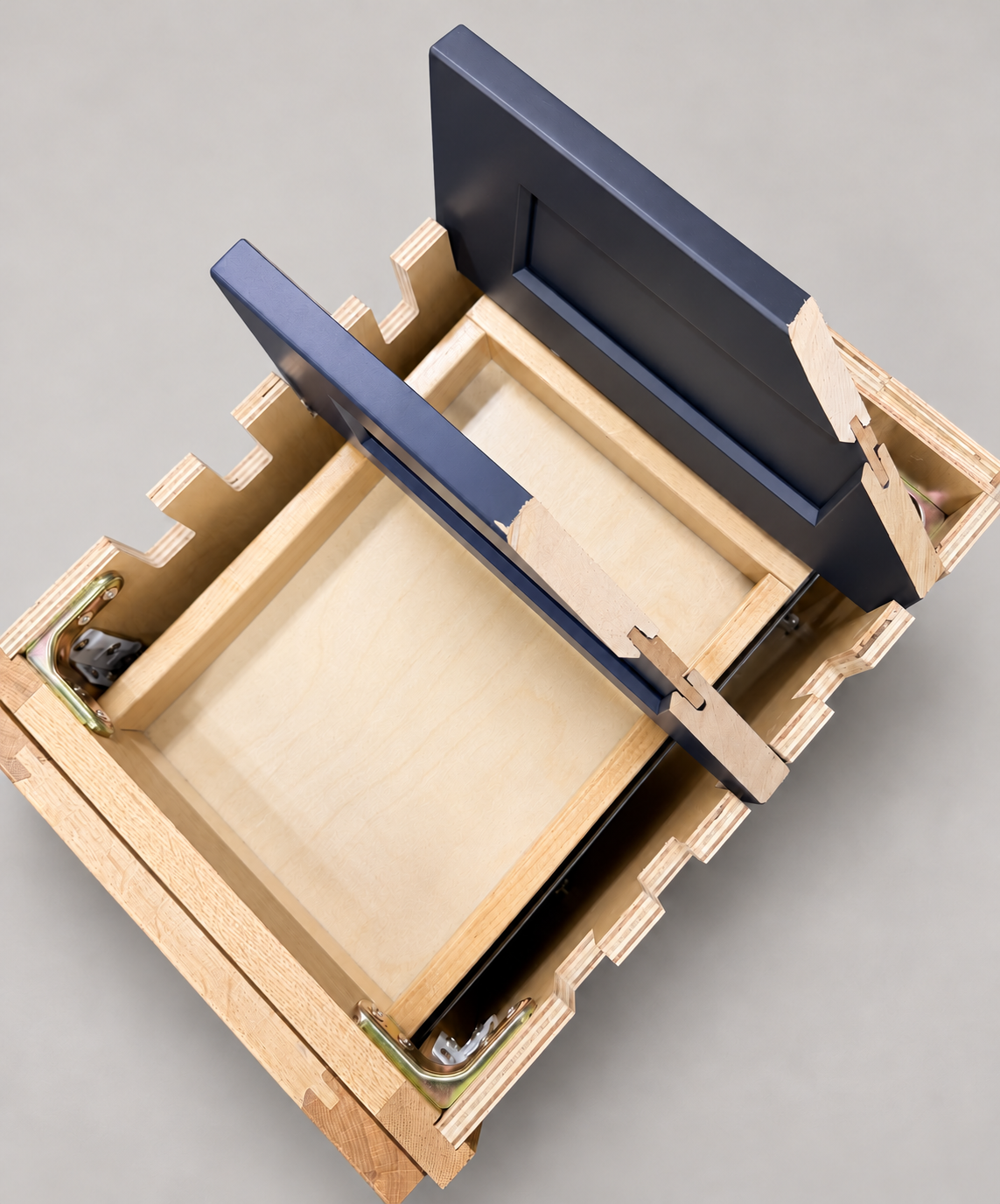
The sample shows the door frame, a separate center panel, the face frame and the cabinet box. Each component has its own place in this Shaker construction.
Shaker construction: door frame, center panel, face frame and cabinet box. The cutaway helps locate these parts; confirm each material in the specifications for the selected cabinet.
01 / Door frame
The Shaker door has rails and stiles around a separate center panel. The frame and center panel are different components; confirm their materials in the specifications for the selected cabinet.
02 / Face frame
The face frame surrounds the opening at the front of the cabinet box and sits behind the doors. The face frame, door frame and cabinet box are separate parts.
03 / Cabinet box
The sample exposes the cabinet sides, interior surfaces and layered edges. The image does not establish the wood species or material specification of a selected cabinet.