Treat the printed scale as a claim to verify on the sheet in your hands. A kitchen drawing may have been reduced to fit different paper, copied or inserted into a document while retaining its original scale label. Before taking a dimension with a ruler, compare a clearly dimensioned span with the length it should occupy on paper. Use the drawing’s written dimensions for their stated purpose, and resolve discrepancies rather than silently replacing them with scaled guesses.
Check the drawing and the view you are using
Find the project, sheet title, revision and intended paper size. Confirm that the page is a dimensioned plan or elevation, rather than a perspective illustration. Different views on the same sheet can have different scales. A detail enlarged for clarity should not be measured using the general plan’s scale. If a view is marked not to scale or its scale is missing, do not create one from a convenient cabinet symbol.
Keep the original PDF if available. A screenshot, photograph of a print or image pasted into a message can change size or proportions. The fact that text is readable does not establish dimensional fidelity. Note which file and revision produced the sheet so that a corrected copy can be traced back to the same drawing rather than a similar-looking earlier layout.
Use a known dimension as a check, not an assumption
Choose a clearly marked dimension whose extension lines identify the endpoints. Calculate its expected paper length from the stated scale, then measure between those same endpoints on the print. A longer clear span is easier to distinguish from line thickness than a tiny detail. Check another known span in the perpendicular direction as well; a stretched image can have different horizontal and vertical scale factors.
A graphic scale bar, when reproduced together with its view, changes size with that view and can help interpret the copy. Confirm that it belongs to the same view and was not inserted separately. Its presence does not validate other details or another viewport. Use it alongside known written dimensions, particularly when a sheet mixes plans, details and illustrations.
ABC
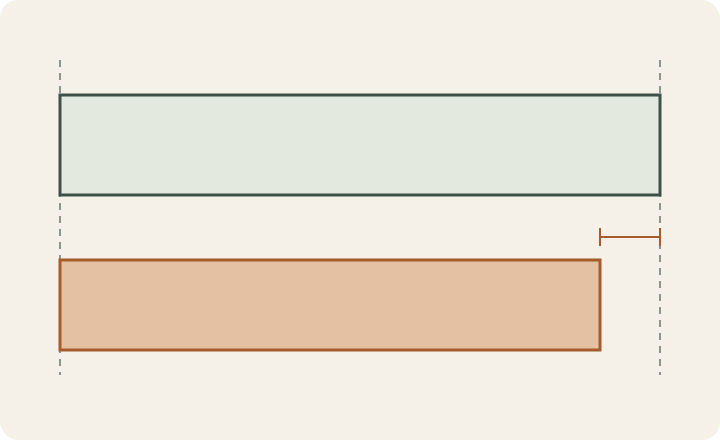
Diagram The lower outline is proportionally smaller while representing the same subject. A retained scale label would not restore its original physical size. This diagram illustrates print reduction, not a kitchen dimension.
A
Intended printed size.
B
Uniformly reduced copy of the same outline.
C
Difference between the corresponding right endpoints.
A small paper change can create a large room error
In a hypothetical drawing at 1:24 scale, a 120-inch span should measure 5 inches on paper. A reduced print measures 4.5 inches, or 90 percent of the intended linear size. If you still apply the original scale, 4.5 × 24 = 108 inches, which is 12 inches short of the written 120-inch span. The room has not shrunk; the reproduction has changed. These are teaching values, not a recommended drawing scale or an acceptable printing error.
Correct the reproduction before relying on it
Adobe Acrobat distinguishes Fit, which resizes to the printable area, from Actual size, which prints without scaling and may crop content that does not fit. Select paper and output settings appropriate to the original drawing, then verify the new sheet physically. A setting name alone is not evidence that the complete printed result is correct.
If the original file cannot be recovered, label the copy as unsuitable for taking dimensions until its scale is established for the intended use. Do not apply a single correction factor to an image that fails the perpendicular check. Cropped extension lines, merged scans or perspective from a phone photograph can leave uncertainty that arithmetic cannot remove. Request the missing dimension or a suitable source drawing instead of inventing it from the cabinet outline.
Keep the verification with the drawing
Record the file and revision, the checked spans, stated dimensions, measured paper lengths and the printing conditions. Mark which views were verified and which remain unsuitable for scale measurement. This makes the copy useful for a layout conversation without presenting it as a field survey or fabrication release. A verified print still needs to agree with the actual room and selected products. Keep finish references as a separate visual choice, so a preferred appearance does not conceal an unresolved dimensional question.
Pure White
Cream White
Light Warm Gray
Gray
Navy
Black
Oak Tone
Dark Walnut Tone
Design study These finish studies are design references, not a list of currently orderable colors. Screens and lighting change the appearance; compare a physical sample before choosing.See all finish options →
Build a room sketch and a cabinet-run total that include the parts between the boxes. A worked example shows why the tighter measurement changes the filler allowance.
A useful photo record shows which wall, edge and measuring direction belong to each note. It does not turn a perspective photograph into a scaled drawing.
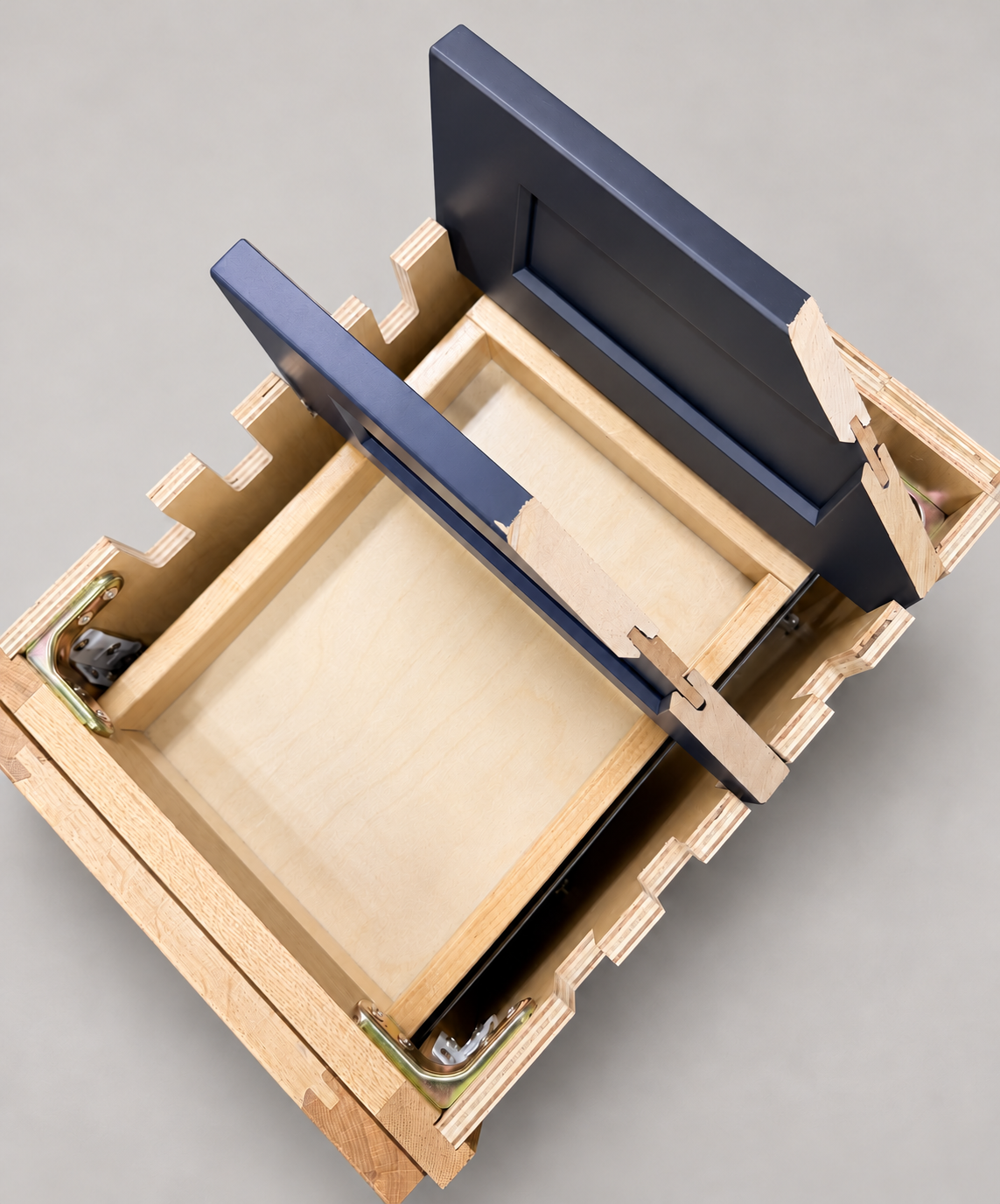
The sample shows the door frame, a separate center panel, the face frame and the cabinet box. Each component has its own place in this Shaker construction.
Shaker construction: door frame, center panel, face frame and cabinet box. The cutaway helps locate these parts; confirm each material in the specifications for the selected cabinet.
01 / Door frame
The Shaker door has rails and stiles around a separate center panel. The frame and center panel are different components; confirm their materials in the specifications for the selected cabinet.
02 / Face frame
The face frame surrounds the opening at the front of the cabinet box and sits behind the doors. The face frame, door frame and cabinet box are separate parts.
03 / Cabinet box
The sample exposes the cabinet sides, interior surfaces and layered edges. The image does not establish the wood species or material specification of a selected cabinet.