How do vanity changes stay consistent across the project drawings?
Record each change as a specific decision, identify every affected document and confirm the revised information with the people using it. A new cabinet drawing alone does not update the basin, top, plumbing or installation information that may already be in circulation.
The common difficulty is not remembering that something changed. It is knowing which version now governs a particular relationship. A homeowner may approve a different drawer arrangement while a separate drawing still places the basin where the former cabinet expected it. A useful revision record connects the decision to its consequences and makes unresolved work visible.
Describe the change before naming a new file
Write what moved, changed function or was substituted, and why. State whether it is a proposed alternative or the selected direction. A file called revised vanity gives less useful information than a note that the basin moves toward the left to preserve a particular drawer compartment.
Include the original condition and the intended replacement in plain language. Keep the user requirement attached: the drawer must still hold the daily kit, or the existing wall connection is to remain. That purpose helps reviewers recognize when an apparently minor correction would undo the reason for the change.
Design study A coordinated front does not identify the current drawing issue; project records must do that.
Identify the information that depends on it
Trace the changed relationship through cabinet, top, basin, faucet and service information as relevant. A shifted basin may affect its opening, the faucet relationship and the drawer's occupied interior. It does not automatically mean every project document needs revision, but the relevant interfaces should receive an explicit check.
For example, moving a basin in the cabinet elevation is not enough if the top drawing still shows the old cutout location. The plumbing reviewer also needs the chosen position and the retained connection condition. List those affected items so the team can answer whether each needs a change, a confirmation or additional information.
Keep a usable decision record
For each item, record the decision description, responsible reviewer, document identifier and revision, current status and the evidence that closes it. Use meaningful states such as proposed, selected pending coordination, revised and checked. Sending a file or receiving a message is not the same as confirming the relationship it describes.
Attach the actual drawing or document reference to the record. If a phone conversation resolves a question, write the answer back into the relevant project information and have the responsible party confirm it. A homeowner should not have to reconstruct a basin location from scattered messages while an installer is working from a printed sheet.
Give conditional decisions their own dependency. If a cabinet arrangement is selected only if the existing connection can remain, name the person checking that condition and the document containing the answer. Do not silently remove the condition when the cabinet drawing is reissued; the new filename has not resolved the plumbing question.
Separate current information from retained history
Make the current set easy to identify and mark superseded copies clearly in the shared project record. Retain the previous version as history where useful, with its status visible. Avoid relying on file modification time, a familiar thumbnail or the word final as the only explanation of authority.
Include printed copies and separately saved attachments in the communication. Ask affected recipients which revision they are using and whether the change reaches work already ordered or performed. Replacing a file in a folder cannot, by itself, establish that everyone depending on the old information has adopted the new condition.
Check the assembled change, not just the edited mark
Review the updated views and component documents together. Compare the same basin position, cabinet configuration and finished reference surfaces. Look at the purpose of the original change as well as its new technical relationships; a revised cutout can agree with a plan while the household's intended drawer has disappeared.
If the team has not resolved an interface, record that uncertainty next to the affected decision. Do not hide it inside a general approved label. Define which dependent step remains pending and who will supply the missing answer, so unrelated confirmed information can remain useful without suggesting the entire assembly is settled.
Close the loop before relying on the revision
The record is complete when the affected documents agree, the responsible parties have checked their interfaces and the current versions are identifiable to those using them. Keep any confirmed field change with the same history so later service does not rely on a design that was never installed.
Bring this record to the final assembly review. It should explain the actual selected combination and any remaining conditions without requiring memory of the discussion. That makes the revision log a practical coordination tool rather than a growing list of filenames.
Pure White
Cream White
Light Warm Gray
Gray
Navy
Black
Oak Tone
Dark Walnut Tone
Design study These finish studies are design references, not a list of currently orderable colors. Screens and lighting change the appearance; compare a physical sample before choosing.See all finish options →
The elevation explains the front arrangement; the plan reveals where that arrangement occupies the room. Compare them using the same cabinet position, finished surfaces and selected components, then add the movements needed for actual use. Symmetry is only part of the decision.
Use a mockup to test where the proposed assembly sits, how people approach it and how selected storage is reached. Represent the relevant projections and moving fronts from the current drawings. Treat the result as a room-use comparison, with structural, plumbing and product compatibility questions still requiring their own review.
Use the drawing to confirm what will be supplied, how the actual assembly fits the room and whether the storage works for its intended contents. Read the written dimensions, view labels and notes together; a balanced front view alone cannot answer those questions.
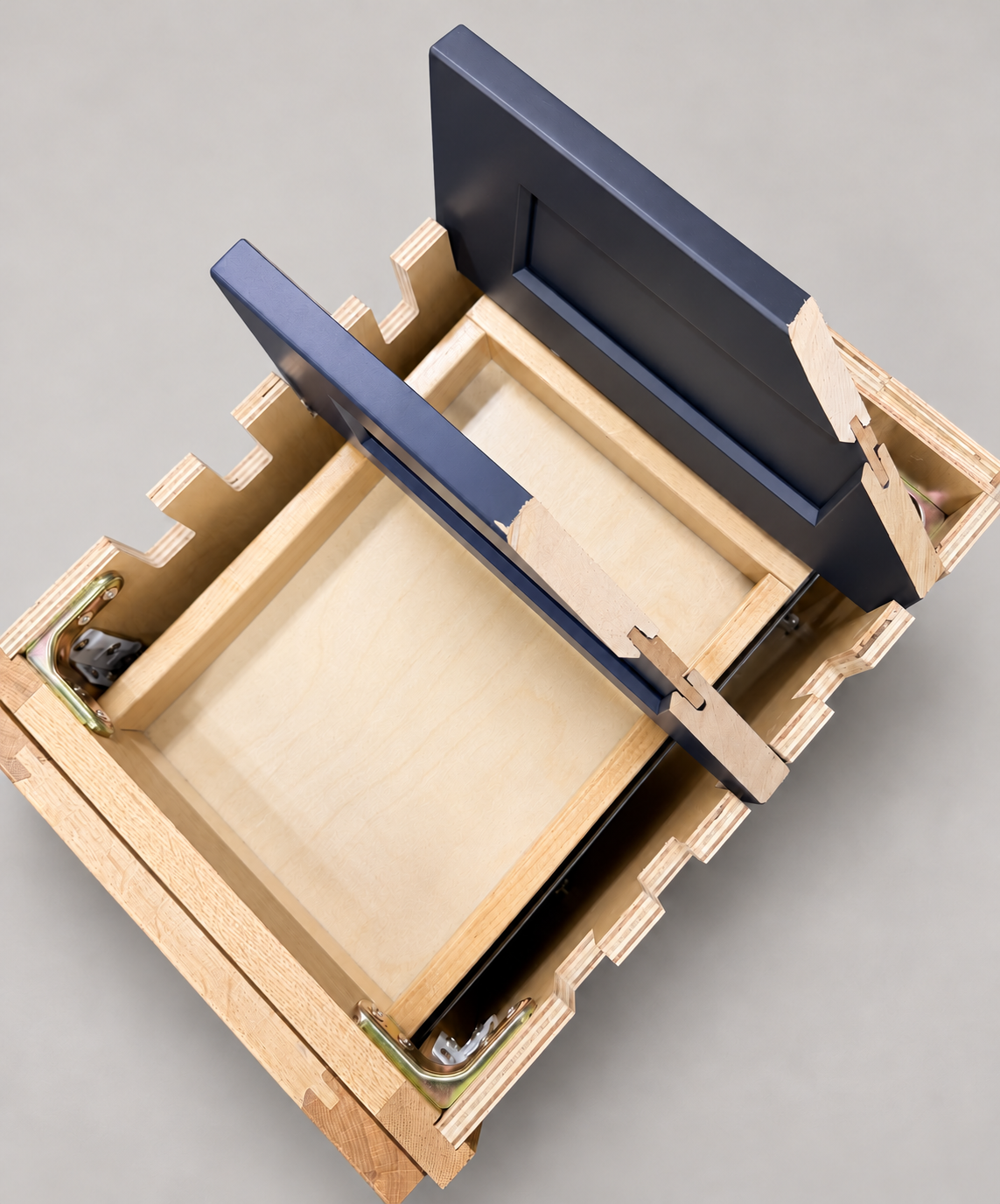
The sample shows the door frame, a separate center panel, the face frame and the cabinet box. Each component has its own place in this Shaker construction.
Shaker construction: door frame, center panel, face frame and cabinet box. The cutaway helps locate these parts; confirm each material in the specifications for the selected cabinet.
01 / Door frame
The Shaker door has rails and stiles around a separate center panel. The frame and center panel are different components; confirm their materials in the specifications for the selected cabinet.
02 / Face frame
The face frame surrounds the opening at the front of the cabinet box and sits behind the doors. The face frame, door frame and cabinet box are separate parts.
03 / Cabinet box
The sample exposes the cabinet sides, interior surfaces and layered edges. The image does not establish the wood species or material specification of a selected cabinet.