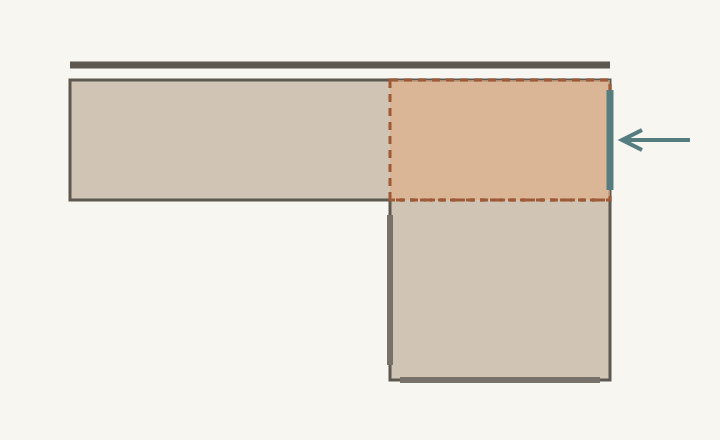
At the attached end of a peninsula, choose the cabinet arrangement and its access face together. A rectangle under the counter is not automatically reachable storage. The adjoining run can cover a face that appears available when each cabinet is drawn separately. First establish which box occupies the junction, then show how its contents come out without passing through another cabinet or a blocked opening.
Give the junction a single, explicit cabinet arrangement
Draw the wall run and peninsula in plan, showing cabinet boxes rather than only counter edges. Mark the connected corner or root. If a cabinet from the wall run extends into that space, a peninsula cabinet cannot independently occupy the same volume. The counter may look continuous while the storage below is divided, inaccessible or served from a different direction.
Ask the cabinet plan to identify the actual assembly at the junction: a box opening toward the outer face, a compatible corner arrangement reached from the work side, or a deliberately closed space. Do not label the same area as full storage for both runs. A decorative front, finished back or end panel should not be counted as an opening unless the selected design actually makes it one.
ABCD
Diagram The shaded root is a shared planning junction, not an extra cabinet layered over another. The outer access arrow is an option to verify; the long inner face and free end serve different positions.
A
Root where the runs meet; assign its box and contents explicitly.
B
Possible outer access, only if the selected cabinet and room allow it.
C
Inner face farther along the peninsula does not automatically open the root.
D
The free end is a separate storage approach.
Compare access options by the complete retrieval
Outside access can serve items used beyond the cooking area, provided someone can stand there and open the selected front. Check furniture, stools, nearby doors and the object’s path out of the cabinet. A door that opens technically may still leave the user reaching sideways from a passage. Record whether routine use requires walking around the peninsula from the work side.
Work-side corner access keeps the task inside the kitchen but depends on the specific cabinet and hardware. Obtain the actual opening, moving components and usable storage shape; a generic corner symbol does not show how a large bowl is removed. Also consider an intentional closed void if neither approach serves a meaningful task. Its lost volume is visible in the plan, while an awkward nominal cabinet can hide a similar loss behind a door.
Use the intended contents to choose the face
In a hypothetical layout, serving bowls are taken to a dining table beyond the peninsula. An outer-facing root cabinet could let the person setting the table collect them without entering the cooking area. The same position is less convenient for pans repeatedly retrieved by the cook inside the U of the layout. Changing the contents may make more sense than forcing every root cabinet to face the same direction.
For the bowl option, test the largest bowl through the real opening with its usual stack and shelf setting. Include lifting, tilting where appropriate and returning it while other items remain stored. Then follow a clean bowl back from cleanup to this home. The outward serving route is only part of the task; the return trip may be the reason the household chooses a different arrangement.
Keep the chosen approach available in daily use
Draw the adjacent furniture as used, not pushed away for the demonstration. If the front needs a chair moved whenever it opens, decide whether that suits the frequency of the stored items. Check that a person using another peninsula face does not occupy the same standing place. An outside-facing cabinet can shift a conflict into the dining area rather than remove it.
Record the box, opening and task as one decision
Save the junction plan, access direction, selected cabinet details, intended contents and the opening test. Mark any closed volume honestly. Recheck when the peninsula length, adjoining cabinet, furniture or storage assignment changes. This record lets the designer evaluate usable storage at the connection instead of treating every area beneath the counter as equally available.
Pure White
Cream White
Light Warm Gray
Gray
Navy
Black
Oak Tone
Dark Walnut Tone
Design study These finish studies are design references, not a list of currently orderable colors. Screens and lighting change the appearance; compare a physical sample before choosing.See all finish options →
The open side of a U-shaped kitchen is also its way in and out. Test the entrance with real front movements, people and carried objects before assigning the end cabinets.
Removing stools does not make every island face equally useful. Start with the work performed at the counter, then assign cabinet access and real internal depth.
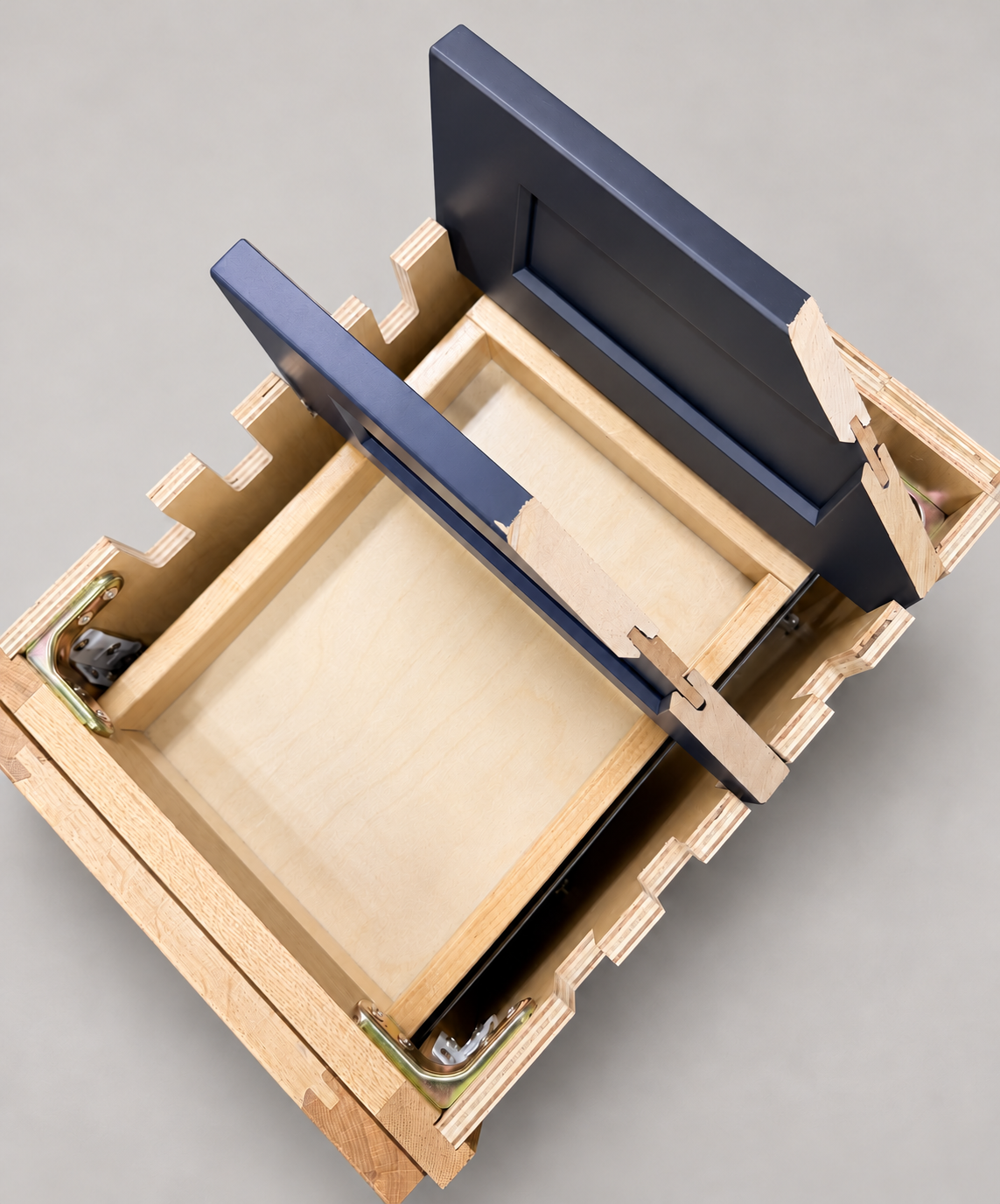
The sample shows the door frame, a separate center panel, the face frame and the cabinet box. Each component has its own place in this Shaker construction.
Shaker construction: door frame, center panel, face frame and cabinet box. The cutaway helps locate these parts; confirm each material in the specifications for the selected cabinet.
01 / Door frame
The Shaker door has rails and stiles around a separate center panel. The frame and center panel are different components; confirm their materials in the specifications for the selected cabinet.
02 / Face frame
The face frame surrounds the opening at the front of the cabinet box and sits behind the doors. The face frame, door frame and cabinet box are separate parts.
03 / Cabinet box
The sample exposes the cabinet sides, interior surfaces and layered edges. The image does not establish the wood species or material specification of a selected cabinet.