Study open-kitchen sightlines before hiding everyday counter equipment
An uncluttered view and an accessible appliance are different tests. Use the household’s real viewpoints and routine to decide what stays visible and what gets stored.
Decide what can remain on an open kitchen counter by studying real views and real tasks together. A photograph taken for the kitchen may emphasize equipment that is barely visible from the living area. Conversely, something tucked behind the island can become prominent from an entrance. Identify the views that matter to the household before adding a screen, tall object or storage enclosure solely to hide equipment.
Choose viewpoints people actually use
Look from the main approach, the dining position and the usual place people sit in the adjoining room. Use each person’s normal eye position rather than holding a phone high above them. Note what attracts attention: the appliance body, loose accessories, containers around it or a collection of unrelated objects. Those are different visual problems and may call for different storage decisions.
Photograph each selected viewpoint from a repeatable position, with the everyday equipment present. Keep the island, chairs and doors in their usual states. A wide-angle view can make foreground objects appear disproportionately prominent, so use the image to locate relationships and confirm them in the room. Do not infer measured dimensions or an unobstructed view from a photograph alone.
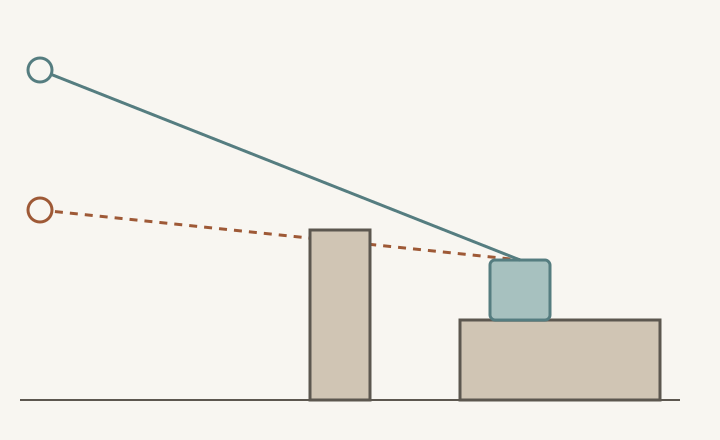
ABCD
Diagram The lines illustrate why changing viewpoint changes visibility. They are not measured eye heights or a proposed room section; repeat the check with the actual room, equipment and people.
A
A higher viewpoint with a clear line toward the equipment.
B
A lower viewpoint whose line meets the foreground island.
C
The foreground island interrupts some views, not every view.
D
Equipment remains physically present even when partly concealed.
Separate the appliance from the objects around it
Observe the counter through a normal use cycle. The equipment may occupy a stable place while packaging, scoops, cups and cleaning items spread around it. Assigning those accessories nearby storage can improve the view without moving the appliance every day. Test whether they can be returned easily after use; a solution that needs a lengthy reset is unlikely to resemble its empty-counter sketch for long.
Keep a separate record of the equipment’s operating position and stored position if they differ. The selected appliance’s instructions determine suitable operation, clearances and access. A location that looks hidden in a view is not evidence that the equipment can operate there. Resolve those product requirements before judging an enclosure or screen by appearance.
Compare concealment with the actual morning task
In a hypothetical household, a coffee grinder is used each morning on a counter seen from the living room. A tall serving tray placed in front hides much of it from the sofa, but the tray must be moved to use the controls and then returned. The grinder is still visible from the entrance. This is a partial visual change with a new daily handling step, not complete concealment.
Compare leaving the grinder in its usable position while giving the loose accessories a nearby home, or relocating it to another permitted operating position. Recreate the same morning task for each option, including where the moved tray or equipment lands. A closed cabinet can be a storage choice only after the actual extraction, use and return sequence has been demonstrated. Do not count the attractive closed state while omitting the work required to achieve it.
Protect the surface that the next task needs
A visual screen or decorative grouping occupies counter area too. Check whether it takes the landing place for a bowl, blocks a cabinet opening or forces equipment into the preparation area. Changing the view by moving objects around can simply transfer clutter into the cooking task. Compare the view from the selected positions again after the complete working arrangement is restored.
Save a realistic view and reset agreement
Keep paired images of the ordinary working state and the state after a normal reset, using the same viewpoints. List what stays out, where accessories return and which movements the household accepts. Recheck after replacing equipment or moving adjacent furniture. The goal is a view the household likes and can maintain while still using the kitchen, rather than a photograph that depends on temporarily removing its daily life.
Pure White
Cream White
Light Warm Gray
Gray
Navy
Black
Oak Tone
Dark Walnut Tone
Design study These finish studies are design references, not a list of currently orderable colors. Screens and lighting change the appearance; compare a physical sample before choosing.See all finish options →
An end door changes the direction of access. Check the opening, depth, grip and standing position before assigning the rear of an island cabinet to everyday items.
Choose the access face and the return route together. Storage near the table can simplify setting it, but only if clean dishes can also be put away and retrieved during meals.
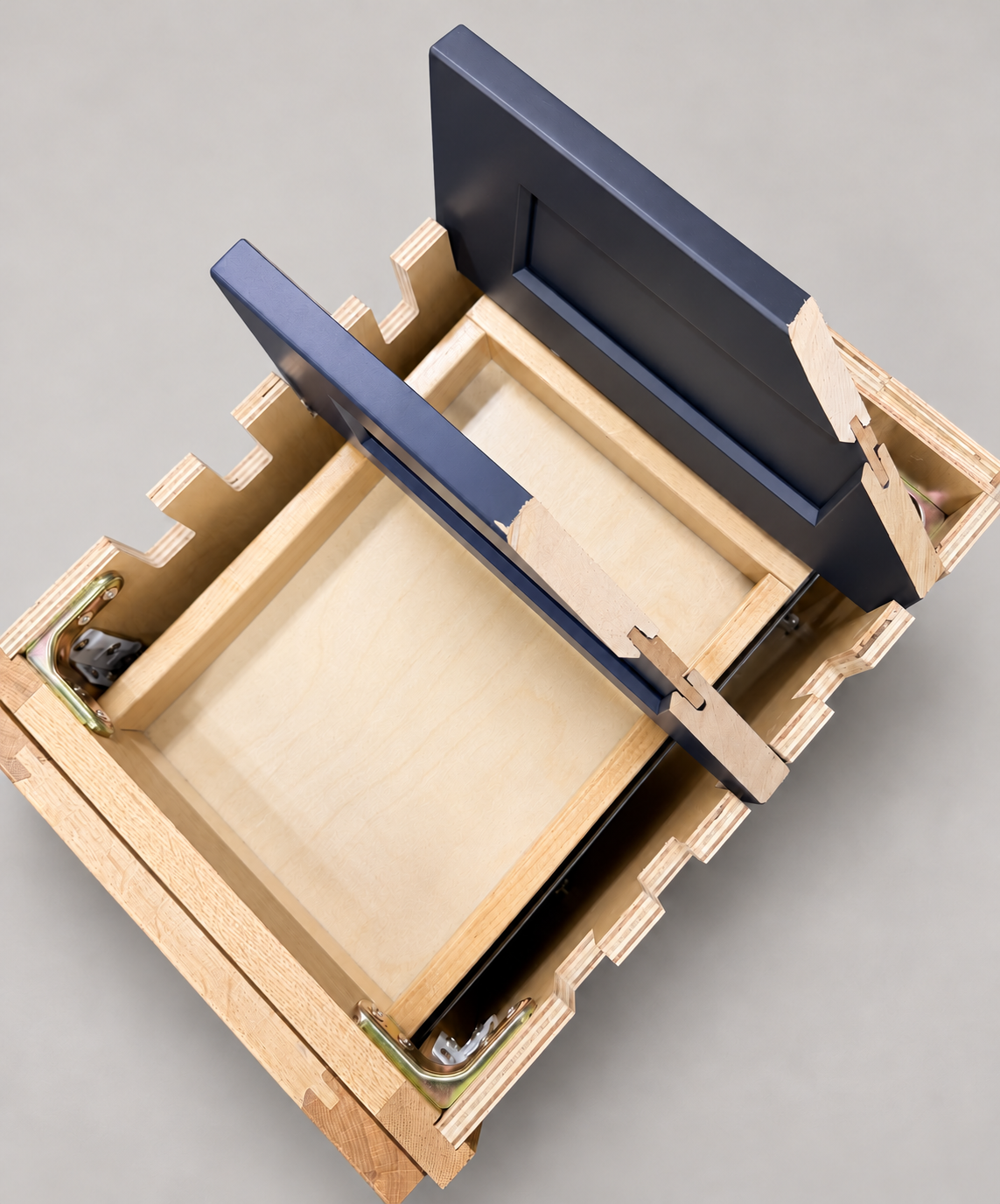
The sample shows the door frame, a separate center panel, the face frame and the cabinet box. Each component has its own place in this Shaker construction.
Shaker construction: door frame, center panel, face frame and cabinet box. The cutaway helps locate these parts; confirm each material in the specifications for the selected cabinet.
01 / Door frame
The Shaker door has rails and stiles around a separate center panel. The frame and center panel are different components; confirm their materials in the specifications for the selected cabinet.
02 / Face frame
The face frame surrounds the opening at the front of the cabinet box and sits behind the doors. The face frame, door frame and cabinet box are separate parts.
03 / Cabinet box
The sample exposes the cabinet sides, interior surfaces and layered edges. The image does not establish the wood species or material specification of a selected cabinet.