Plan cooking modules as a complete countertop assembly
Choose the supported combination and its interface parts before defining the opening. Product width, finished assembly width and countertop cutout are different measurements.
Treat a group of cooking modules as a complete installation, not a row of nominal widths. Start with the exact products and their supported combination. The finished outer edges, interfaces between units and countertop opening must agree with that combination before cabinet or countertop fabrication proceeds. A convincing row of appliance rectangles does not yet establish a buildable assembly.
Identify the exact combination and product generation
Write down each module, its position and the relevant installation documents. Include any larger cooktop paired with the smaller modules. Keep the product generation visible in the record, particularly when retaining an existing appliance and adding a new one. Similar names or matching front finishes do not establish that the same installation detail applies.
Wolf’s multiple-module guidance separates current and older product groups and gives different opening information. Its CT filler-strip page also excludes newer product families from that older strip’s compatibility. Check the selected generation rather than transferring a familiar detail.
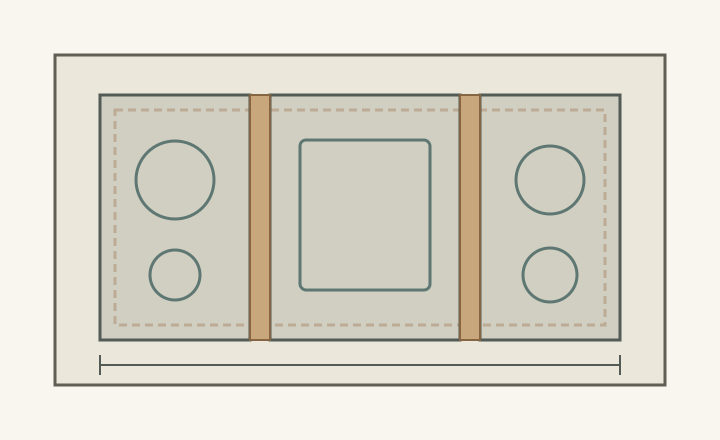
Mark the actual product outlines, the finished outside edges of the group and the required countertop opening as distinct lines. Add the specified interface components where applicable. A strip between modules may affect the assembly detail, but its visible width alone does not tell you how the underlying opening is established. Follow the documented combination rather than inventing a correction formula.
Determine whether the selected arrangement uses a shared opening, separate openings or another prescribed configuration. Have the countertop fabricator and appliance installer agree on the same drawing. The furniture elevation cannot settle the necessary support, fastening or countertop details; those must be resolved for the actual installation before any opening is cut.
ABCD
Diagram A hypothetical assembly separates module outlines, interfaces and opening. It does not specify a supported combination, strip size, countertop bridge or cutout dimension.
A
A product outline is only part of the assembly.
B
The interface needs its own confirmed detail.
C
The dashed opening is a different boundary.
D
Overall finished width spans the whole group.
Recheck the assembly when a component changes
In a hypothetical renovation, the drawing retains an older module beside a proposed replacement. The replacement has the same nominal width, so the old cutout and joining detail are copied. Its actual installation drawing uses a different interface. The unchanged width label concealed a changed assembly; adjusting a filler on site is not evidence that the mixed arrangement is supported.
Resolve this before ordering the countertop: confirm the exact mixed combination or choose a supported alternative. Reissue the complete opening drawing when a model or accessory changes. Do not revise only the appliance schedule while leaving an earlier cutout attached to the fabrication order. An approved combination and a correct individual appliance drawing are separate pieces of evidence.
Coordinate both sides of the countertop
Below the group, map each unit’s body, connections and applicable installation reservations against cabinet rails, partitions and proposed drawers. An opening can fit across the top while a partition conflicts below. Check how the individual service requirements coexist; an empty region beside one module cannot be assigned to storage if another part of the combined installation needs it.
Above the counter, consider the actual cookware and sequence of use. Place representative cold, empty vessels in the proposed arrangement and examine handles, controls and transfer to a clear landing area. This is a workflow comparison, not an operating test or substitute for the manufacturer’s restrictions. A supported assembly can still be inconvenient for the meals the household cooks.
Issue a single coordinated assembly record
Keep the model list, module order, interface parts, opening drawing and below-counter arrangement together. Identify who confirms appliance compatibility and who confirms the fabrication detail. Include the chosen ventilation arrangement in that coordination without treating the countertop plan as an airflow design. Resolve uncertainties before locking the surrounding drawer sizes and cabinet partitions.
The useful final drawing lets a reviewer trace each finished edge and opening back to the selected assembly. If a module changes, that drawing makes the affected interfaces visible. Choose the combination whose installation and cooking tasks both work; nominal width is a shopping description, not a complete countertop instruction.
Pure White
Cream White
Light Warm Gray
Gray
Navy
Black
Oak Tone
Dark Walnut Tone
Design study These finish studies are design references, not a list of currently orderable colors. Screens and lighting change the appearance; compare a physical sample before choosing.See all finish options →
Reserve equipment, the agreed route and access before counting cabinet capacity. The remaining volume matters only if real contents can enter, sit and be retrieved without occupying those reservations.
Design around the actual insert and the tasks that remain after installation. A component can fit inside the enclosure yet lack the movement needed for cleaning or service.
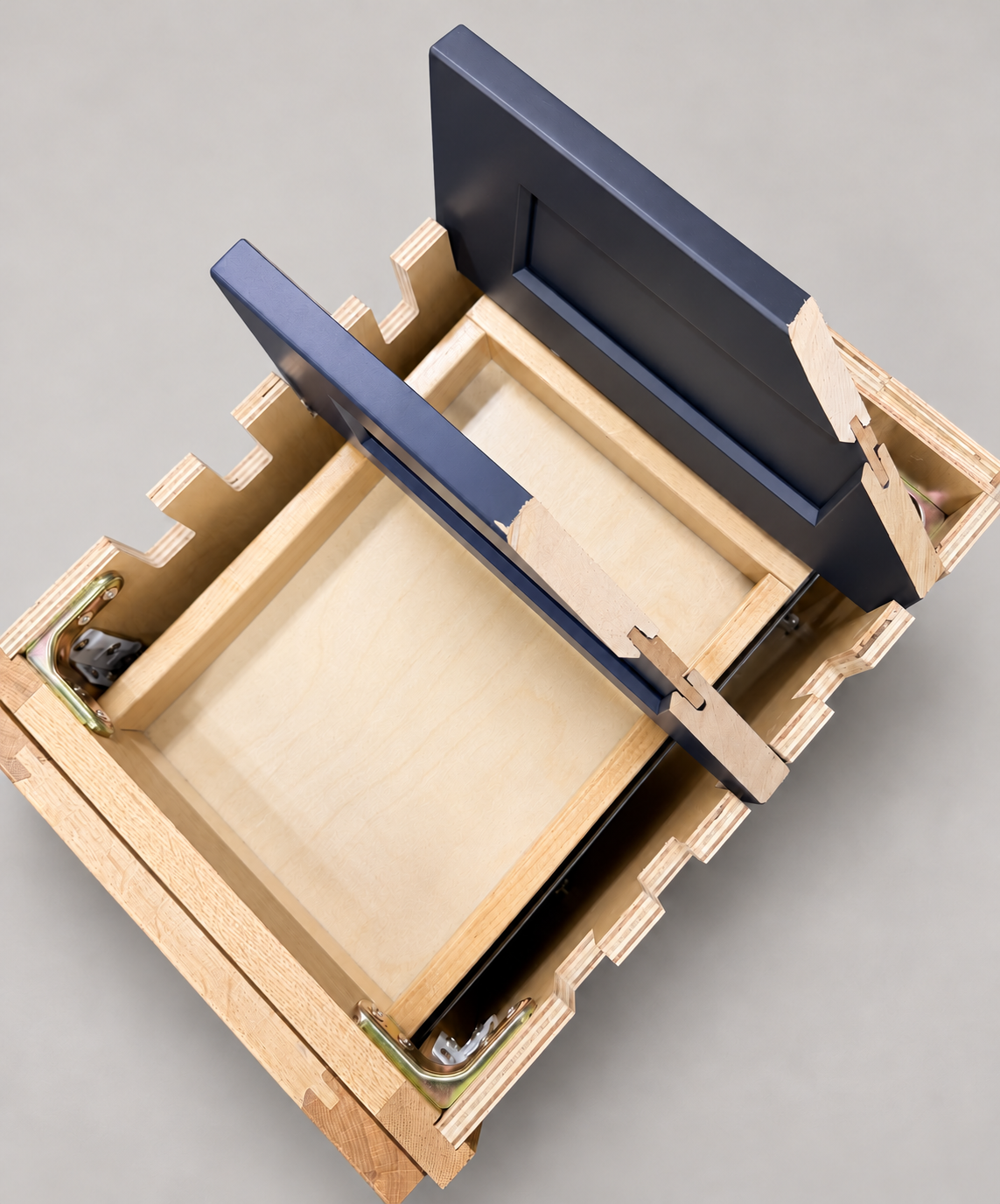
The sample shows the door frame, a separate center panel, the face frame and the cabinet box. Each component has its own place in this Shaker construction.
Shaker construction: door frame, center panel, face frame and cabinet box. The cutaway helps locate these parts; confirm each material in the specifications for the selected cabinet.
01 / Door frame
The Shaker door has rails and stiles around a separate center panel. The frame and center panel are different components; confirm their materials in the specifications for the selected cabinet.
02 / Face frame
The face frame surrounds the opening at the front of the cabinet box and sits behind the doors. The face frame, door frame and cabinet box are separate parts.
03 / Cabinet box
The sample exposes the cabinet sides, interior surfaces and layered edges. The image does not establish the wood species or material specification of a selected cabinet.