Choose the exact quote revision that represents the intended purchase, connect it to the matching drawings and finish selections, and have the seller confirm that the order was entered from that set. The most recently received email is not necessarily the approved version. A price total or a message saying “looks good” does not identify all the details that should reach production.
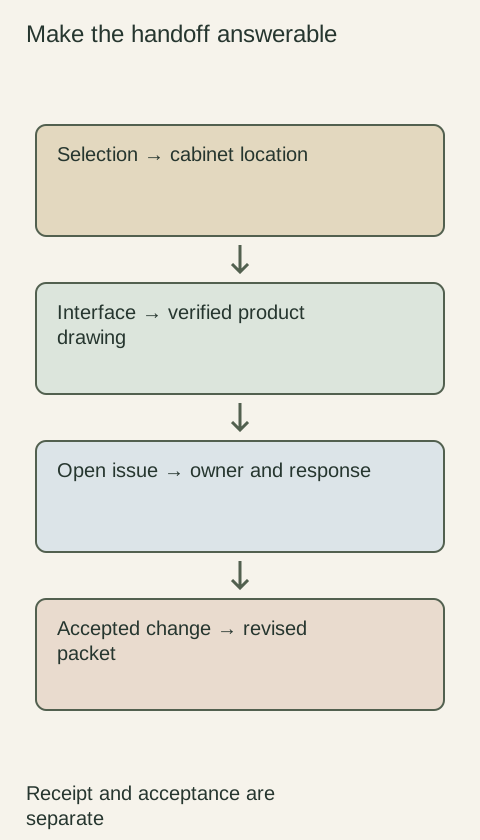
Diagram Connect the accepted revision across the quote, drawings and order confirmation. The diagram describes document coordination, not an order placed through this website.
Give each version an unmistakable identity
Keep the seller’s quote number, revision identifier and issue date on the saved document. Use a project reference as well when several rooms or phases are being discussed. Name the file so the version is apparent without opening it, while preserving the original supplier identifier instead of replacing it with an informal label such as “final final.”
Distinguish working proposal, accepted purchase set and superseded history. A newer file can still be a proposed alternative that nobody selected. Keep historical versions for tracing decisions, but put the accepted set where everyone handling the purchase can find it. The goal is to make its status explicit, not merely to collect documents in chronological order.
Reconcile the changes across the whole set
When a revision arrives, compare the changed line items and the associated drawings. A different finish may require an update to an exposed panel; a changed product may alter hardware or related trim. Ask for a clear description of the changes and review the affected components rather than checking only whether the new total seems plausible.
Keep unresolved questions visibly separate from accepted selections. If a drawing shows a detail still awaiting confirmation, identify it as pending and establish whether the order can proceed without it. Do not let a handwritten note on an earlier page silently override a newer item list. The seller needs a coherent set rather than a puzzle assembled from several email attachments.
Separate editing a quote from placing the order
Conestoga’s published portal announcement distinguishes updating quote details from turning a quote into an order. That process distinction is useful even when your seller uses email or another system: a revised proposal is not evidence that the resulting order contains the revised choices.
Ask what document or confirmation shows the actual order entry, and compare it with the accepted purchase set before release. If the seller uses different identifiers for quotes and orders, record the connection. A payment reference can help identify the transaction, but it should not be the only record of product configuration, finish and quantity.
An accepted change can disappear in an old attachment
Imagine replacing a painted exposed end panel with a wood-tone panel after reviewing samples. The seller emails a revised quote, and the buyer approves the appearance by message. Later, a purchasing contact forwards an earlier quote to place the order because its file was already saved in the project folder.
Prevent the conflict by marking the earlier set as superseded and naming the accepted quote and drawing revision in the purchase instruction. Check that the seller’s order confirmation carries the wood-tone panel with the intended finish and quantity. The example is not solved by proving someone once discussed the change; it is solved by verifying that the specific change reached the order being released.
Keep later changes attached to the accepted baseline
After release, route a requested change through the seller’s actual process and obtain a response describing whether it can be made and what it affects. Do not overwrite the accepted file and assume the existing order changes with it. Preserve the original set, the change request and the seller’s confirmation so the sequence remains understandable.
At receipt, use that same accepted baseline and confirmed changes to identify what should arrive. This connects selection, purchase and checking without treating every old alternative as an active requirement. A useful version record is brief but decisive: which set was accepted, who communicated it, how the seller identified the corresponding order and which subsequent changes were confirmed.
Pure White
Cream White
Light Warm Gray
Gray
Navy
Black
Oak Tone
Dark Walnut Tone
Design study These finish studies are design references, not a list of currently orderable colors. Screens and lighting change the appearance; compare a physical sample before choosing.See all finish options →
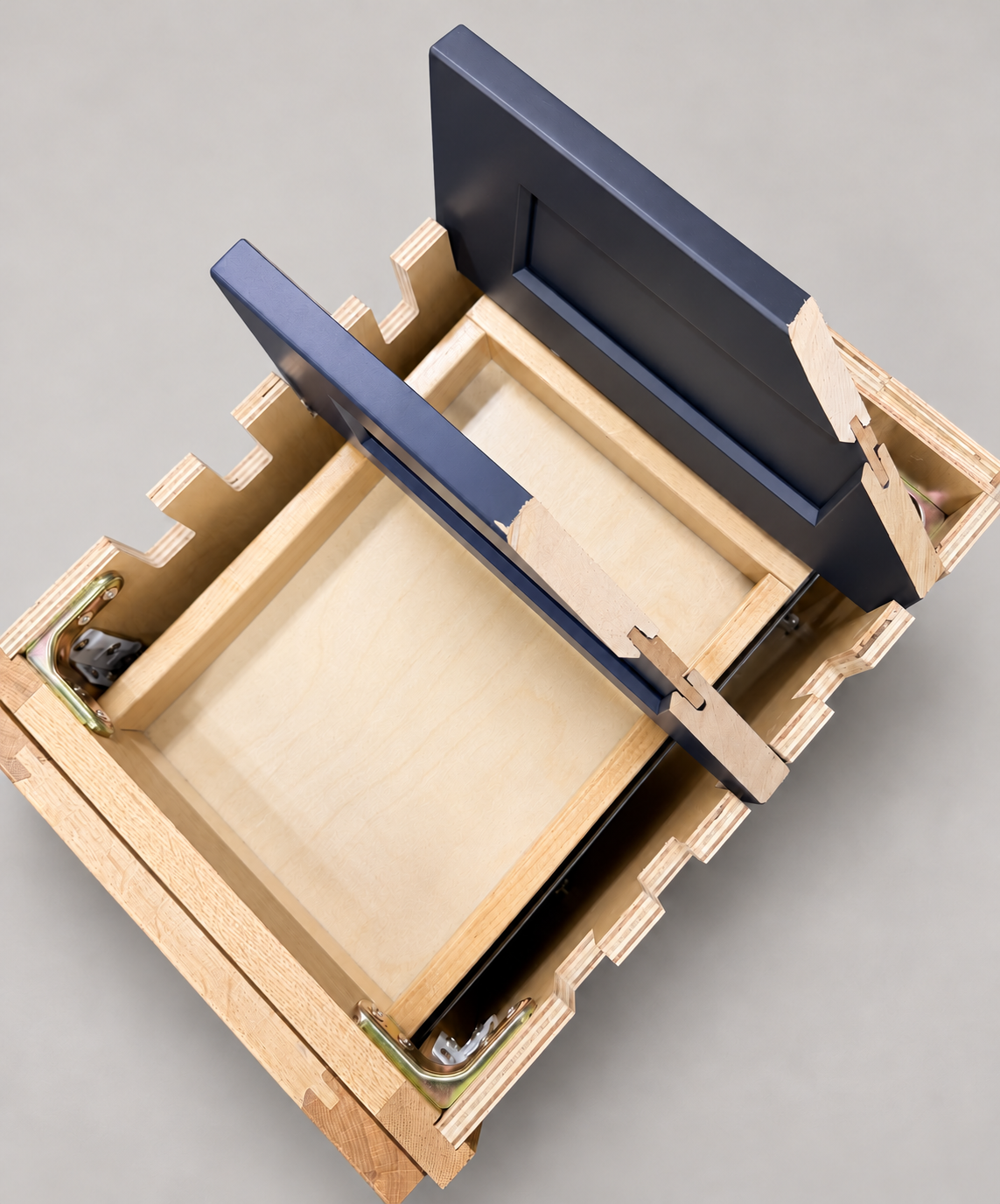
The sample shows the door frame, a separate center panel, the face frame and the cabinet box. Each component has its own place in this Shaker construction.
Shaker construction: door frame, center panel, face frame and cabinet box. The cutaway helps locate these parts; confirm each material in the specifications for the selected cabinet.
01 / Door frame
The Shaker door has rails and stiles around a separate center panel. The frame and center panel are different components; confirm their materials in the specifications for the selected cabinet.
02 / Face frame
The face frame surrounds the opening at the front of the cabinet box and sits behind the doors. The face frame, door frame and cabinet box are separate parts.
03 / Cabinet box
The sample exposes the cabinet sides, interior surfaces and layered edges. The image does not establish the wood species or material specification of a selected cabinet.