Custom graphic laminate cabinet fronts: approve the image and the finished doors
A photograph or illustration can become a cabinet surface, but a print-ready picture and a usable set of doors are different deliverables. Plan both before ordering.
Choose custom graphic laminate fronts when a particular image belongs in the room and you are prepared to approve its production layout. The purchase includes more than selecting a beautiful picture: its detail must survive enlargement, its subject must survive door divisions, and the finished fronts must still function as cabinets. If those requirements conflict, change the composition before manufacturing rather than hoping the installer can recover it.
Wilsonart by You offers custom high-pressure laminate using photography, graphics and original patterns, including laminate-door applications. That establishes a custom surface option; it does not make a supplied image a complete cabinet order.
Find the original image file rather than a screenshot, message attachment or thumbnail. Record its pixel dimensions and the intended printed size. A file can look crisp on a small screen and still lack detail when it fills a bank of fronts. Cropping also matters: the usable pixels are those left after the composition has been trimmed, not the dimensions of the untouched original.
Wilsonart’s formatting guide calls for full-size, print-ready artwork, preferring 200 dpi and requiring at least 100 dpi for raster images. Those are requirements for that program, not a universal cabinet-printing standard.
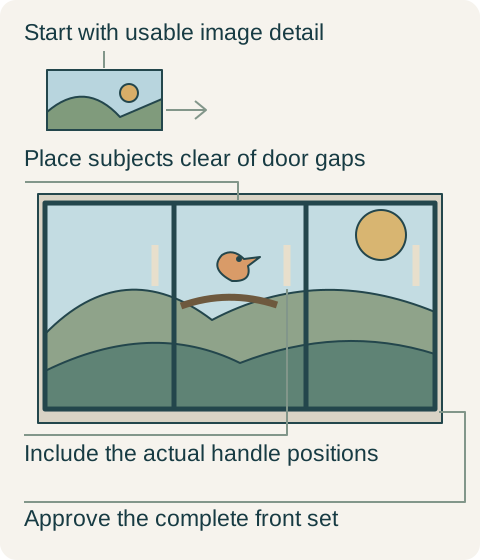
Teaching example Hypothetical graphic-front composition. The bird stays within the center front; gaps cross background and handles remain visible in the review. The drawing is not a printer template, fabrication tolerance or product specification.
In a hypothetical project, a 6000 × 4000-pixel photograph is intended for a 60 × 40-inch image field. Dividing pixels by inches gives 100 pixels per inch in both directions. Reducing the same uncropped image to 30 × 20 inches gives 200 pixels per inch. Changing only the resolution number in a file dialog does not supply new captured detail. Ask the designer to report the effective resolution of the final crop at its actual output size.
Compose with the doors closed and open
Place the cabinet elevation over the artwork. Include the real door and drawer boundaries, the finished edge zones and the handles. A gap crossing sky or an abstract background may be unobtrusive; the same gap through a face, a bird’s eye or a letter can destroy the intended focal point. Move or recrop the subject within the agreed design instead of narrowing functional gaps or relocating hardware without checking its operation.
Then consider normal use. A cabinet image assembled from several fronts comes apart when a door opens. That may be an enjoyable effect, but it is different from a permanent wall picture. For a design that must remain legible while the cabinet is in use, independent illustrations on each door or a fixed decorative panel may be the better composition. A tiny thumbnail of the entire room cannot settle this; inspect a close view of the proposed divisions.
A printed sheet and a finished front need different approvals
The sheet layout shows where the printer places the image. The fabrication layout shows which portions become each front after trimming and cutting. Put both in the same review. Otherwise, a perfect print can still be cut into the wrong pieces or lose a critical border. Identify the finished front outlines separately from any manufacturing allowance. Do not treat a generous image margin as permission to change the agreed finished dimensions.
The graphic does not specify the supporting board, reverse, edge treatment or hardware preparation. Compare those parts of the quoted front package too. Decide whether the picture stops at a contrasting edge, continues through an offered edge detail, or is framed by a plain border. A front that looks like a photograph head-on can reveal a very different edge as it opens. A loose laminate sample cannot represent that completed junction.
A larger original preserves the intended cabinet image
Return to the hypothetical 60 × 40-inch composition. The initial file meets the cited program’s minimum density, but the owners want to inspect fine branches from nearby. Their photographer supplies a larger original of the same scene; the approved crop retains 12000 × 8000 genuine source pixels. At the planned size it provides 200 pixels per inch without enlarging the smaller file. They select this source after reviewing a representative physical print, rather than claiming that the density alone guarantees the final appearance.
In this hypothetical design, the composition spans three fronts. A bird initially falls across a working gap, so the designer shifts the crop until the bird sits wholly on the center front and the joins pass through background. The owners approve the revised composition with the real handle outlines, choose a plain coordinated edge, and purchase the fabricated fronts with their specified supporting construction. They keep the whole image rather than shrinking it to a small insert, because the higher-detail original and revised crop resolve the problems that mattered.
Keep a repeatable production record
A later replacement needs more than the photograph’s filename. Retain the approved file version, output dimensions, crop, panel map, finish and front identifiers. A revised export or a slightly different crop could move a recognizable feature even if the replacement has the correct outside size. This record gives the fabricator a defined starting point; it does not promise an invisible future color match or unlimited material availability.
Before assembly, compare the labeled fronts in their approved order and orientation. Check a critical subject, the image boundaries and the edge treatment together. The useful acceptance question is whether the supplied pieces reproduce the agreed cabinet composition, not whether each piece contains attractive printing. A custom image earns its place when it still works as a complete, operable set of fronts.
Pure White
Cream White
Light Warm Gray
Gray
Navy
Black
Oak Tone
Dark Walnut Tone
Design study These finish studies are design references, not a list of currently orderable colors. Screens and lighting change the appearance; compare a physical sample before choosing.See all finish options →
Choose antiqued mirror for the reflected scene and concealed storage you want. Compare the full door group, its patterned surface and the view when it opens before replacing transparent glass.
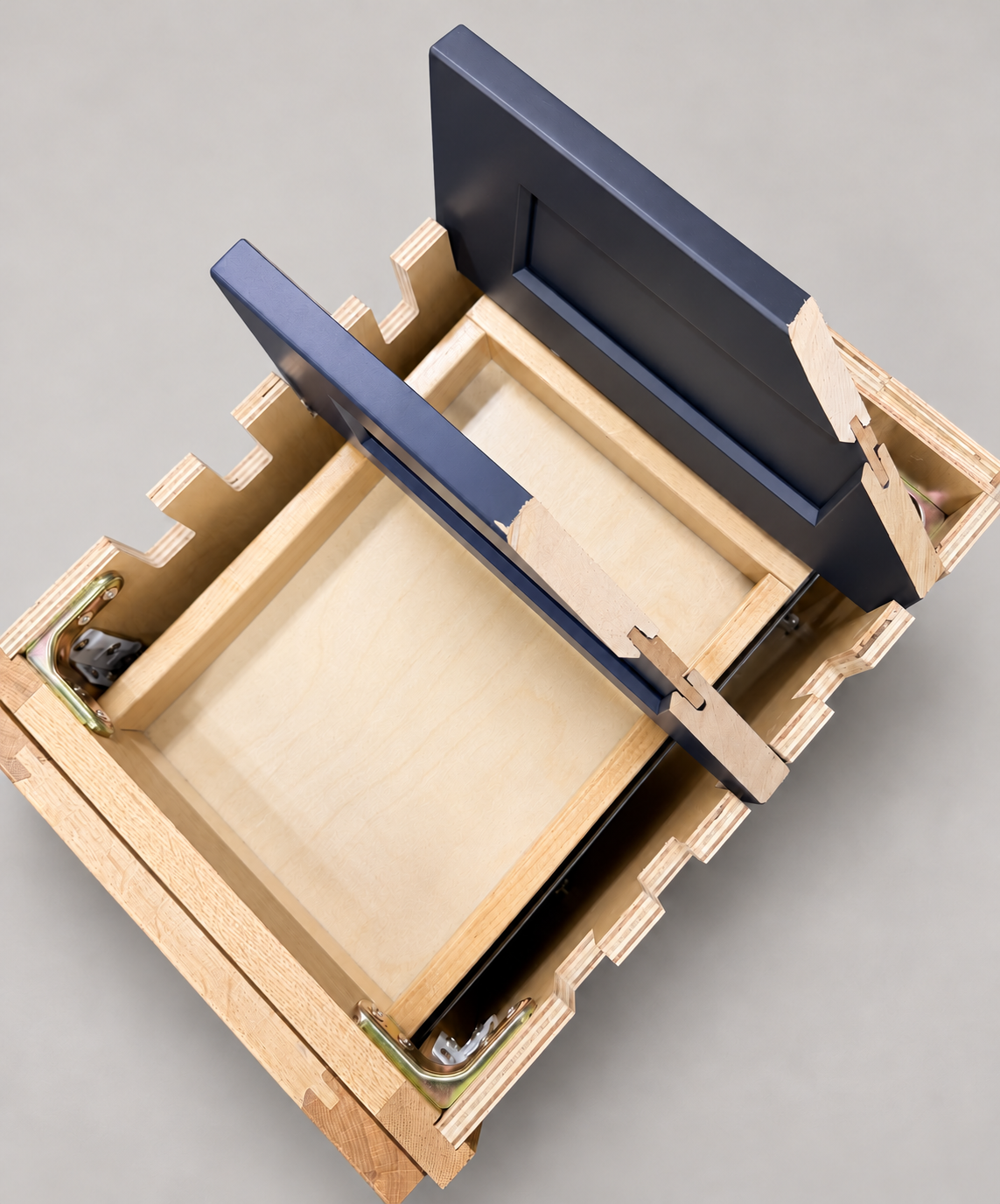
The sample shows the door frame, a separate center panel, the face frame and the cabinet box. Each component has its own place in this Shaker construction.
Shaker construction: door frame, center panel, face frame and cabinet box. The cutaway helps locate these parts; confirm each material in the specifications for the selected cabinet.
01 / Door frame
The Shaker door has rails and stiles around a separate center panel. The frame and center panel are different components; confirm their materials in the specifications for the selected cabinet.
02 / Face frame
The face frame surrounds the opening at the front of the cabinet box and sits behind the doors. The face frame, door frame and cabinet box are separate parts.
03 / Cabinet box
The sample exposes the cabinet sides, interior surfaces and layered edges. The image does not establish the wood species or material specification of a selected cabinet.