

For professionals
Updating a cabinet design-software catalog before an order: what must be checked again?
A new manufacturer catalog can affect the project data used to design or price a kitchen. Preserve the accepted proposal, test a copy and reconcile actual changes before the new file becomes an ordering authority.
Test the catalog update before letting it change a live order
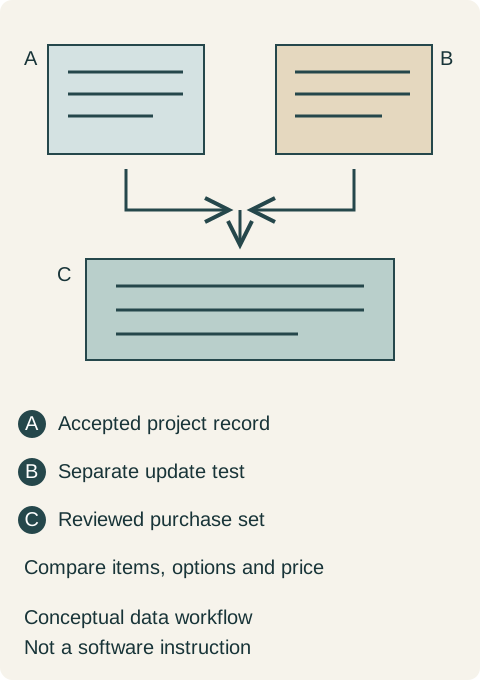
When a new cabinet catalog becomes available in design software, preserve the accepted project record and test the update separately before using it to release the order. The important question is what changes in the actual purchase: product identity, options, dimensions, pricing or availability. A familiar rendering does not answer that question, and a new catalog file is not itself a customer's approval.
This review matters most when a project has already been priced or accepted. An early concept can explore the current product range freely. A live purchase needs a clear account of whether the new information confirms the accepted design or requires another decision. Updating the software and authorizing a changed cabinet order are separate actions.
Identify the actual catalog and the job it performs
Record the manufacturer, collection, catalog identifier and release information supplied with the file. Ask which version the seller currently accepts for ordering. A recent download date alone says when someone acquired the file; it does not prove that the file is the current ordering catalog or that all products displayed are available in the selected combination.
Merillat's professional design-tools page provides access paths for manufacturer content used in several design programs and for its software catalogs. That shows why the catalog is a distinct design resource. It does not establish that every software model is an approved order or that the same file format serves every dealer.
Reading note: Merillat — Design Tools for Professionals.
Ask what each resource represents. A geometry library, an inspiration image, a specification document and an electronic ordering catalog may overlap without performing the same role. Identify the actual commercial and technical references the seller needs. Otherwise a designer can carefully update the wrong resource while the purchasing system continues to use different information.
Preserve a view of the project that does not depend on the next update
Before testing, retain the accepted elevations, item schedule, finish selection and quote as readable exports, together with the native project and recorded catalog identity. Use the software provider's supported backup method. Do not assume that saving a second filename preserves every linked catalog or calculation setting; ask how the program retrieves that information when reopening the project.
Keep the test copy clearly labeled and out of the folder used for purchase release. A separate test is useful because its results can be compared with the accepted record. If the only retained copy is silently recalculated, the team may be unable to explain whether a later difference came from a catalog revision, a deliberate design change or another setting.
Compare the purchase data before comparing the picture
Start with cabinet identities, quantities and configuration. Look for items that no longer resolve, options that have changed status, substitutions and parts that become separate line items. Check exposed ends, matching panels and trim as well as the obvious cabinet boxes. A small hidden option can affect a completed kitchen even when its front view looks unchanged.
Review dimensions and relationships against current product documentation. If a proposed replacement has different installation or accessory requirements, bring that change back to the actual project. A model that still fits graphically does not settle the physical compatibility of its hinge, front, hardware or neighboring appliance. Ask a specific question about the changed item rather than treating the whole catalog as either reliable or defective.
Then examine the elevation. Door segmentation, grain representation, filler appearance and displayed accessories may alter a client's understanding of what is included. Separate a visualization change from a change to the ordered product. An updated picture can require an explanation even when the commercial item stays the same, while an unchanged picture can conceal a changed configuration.
Recalculate a quotation on a stated basis
Check the complete pricing basis: catalog pricing, selected options, entered factors, additional charges and the seller's actual quotation process. Do not compare totals until those inputs are identified. A difference may be intentional, a missed setting or an item the previous version did not include. The seller should explain the cause for the actual project.
For a hypothetical example, suppose an unchanged group of cabinets has a base of $2000. A test with an illustrative factor of 1.10 produces $2200, while 1.15 produces $2300: a difference of $100. These invented figures demonstrate why the calculation basis matters; they do not describe a manufacturer's pricing method, a dealer discount or an actual price increase.
In that hypothetical comparison, neither result becomes the accepted purchase merely because the software calculated it. The buyer asks which factor belongs to the current quote and whether the supplier has accepted that quote's basis. If the product group also changes, its effects must be separated from the factor change before explaining the new total.
Resolve differences while they are still a proposal
Record each meaningful difference with its project location, old reference, proposed reference and required response. Some questions belong to the supplier, others to the designer or owner. Do not assign a plausible replacement just to remove an error message. The right outcome can be retaining a valid earlier selection, accepting a documented replacement or revising the design.
The required response should be concrete. If a cabinet is no longer available as configured, establish which alternatives are actually offered and what each changes. If the question is only a display issue, retain the confirmation explaining that distinction. Close the review when the purchasing references, visible design and accepted choices agree, rather than when the software stops displaying warnings.
A catalog test can reveal a missing scope decision
Imagine a designer testing a newer catalog on a kitchen that already has an accepted quote. Most fronts look familiar, but an exposed-side treatment now appears as a separate selectable item. The team initially assumes it is only a software change because the rendered cabinet still looks finished.
The designer compares the accepted schedule and asks the supplier whether that treatment was included in the quoted configuration. If it was included, the new test needs a correct representation without purchasing it twice. If it was omitted, the owner needs an explicit decision about scope and price. The catalog does not decide which explanation is true.
The final release should name the accepted product references and confirmed changes. Keep the test and its review notes as history, while making the purchasing set easy to identify. Future service staff should be able to find what was ordered without reconstructing whichever catalog happened to be installed on a designer's computer that day.
Make the next update easier to evaluate
Assign responsibility for catalog updates and for reviewing live projects affected by them. A team can test new data before broadly changing its working environment, using the software's supported methods. Keep observations about actual behavior tied to the program and version tested; do not turn one experience into a rule for every design system.
For the customer, the useful result is straightforward: the kitchen they approve, the products the seller confirms and the information sent for ordering should describe the same purchase. A catalog update earns its place by improving that agreement, with its effects understood before anyone releases the order.
Sources & further reading
- Merillat — Design Tools for Professionals